-2.png)


Culling wedding photos is the process of narrowing thousands of raw frames down to the gallery you actually deliver, choosing the sharpest frame from each set, the best expression in every group shot, and the moments that tell the story of the day. A typical wedding produces 3,000–5,000 frames that get culled down to 600–1,000 deliverables, usually against a turnaround clock and a couple waiting on their sneak peeks.
AI culling tools like FilterPixel score every frame on focus, eyes-open, and expression quality, then group near-identical shots, compressing a 4–6 hour manual cull into roughly an hour of guided review.
The Part of the Wedding Nobody Posts About
The reception ends at midnight. You get home, dump two cards onto your SSD, and there they are: 4,300 frames. The couple already texted asking when they'll see "just a few" from the day. Your inbox has three other galleries waiting. And the cull i slow, eye-straining work of deciding which of the eleven nearly identical first-kiss frames is the frame hasn't even started.
This is the work that doesn't make the highlight reel, and it's the work that quietly decides whether you keep your evenings during wedding season. Wedding photographers get plenty of advice on shooting and editing.The culling step is the bottleneck that actually eats the hours usually gets reduced to "just be decisive," which is about as useful as telling someone to "just shoot less."
We've spent years building AI culling for high-volume photographers at FilterPixel, and the wedding cull is the single most emotionally loaded version of the problem. You're not filtering interchangeable burst frames, you're choosing between moments you were in the room for, for clients who are also the subjects and will have feelings about every frame of themselves.-1.png?width=1350&height=270&name=BLOG%20DRAFTS%20(14)-1.png)
Shot thousands of photos? FilterPixel culls a full wedding in minutes using genre-specific AI, then hands you back the keepers with a reason for every call. Try DeepCull free →
Why Wedding Culling Is Hard in a Completely Different Way Than Sports
If you also shoot events or sports, you already know that those genres are burst-heavy — thousands of near-duplicate frames where the only difference between keeper and reject is millimeters. Weddings are the opposite problem. Weddings are variation-heavy: lots of meaningfully different frames, fewer true duplicates, and three specific traps that make the cull slow.
You love the moments, so you keep too many. You remember the bride's mother crying during the toast. That emotional memory makes you reluctant to cut frames a stranger would reject instantly. Emotional attachment is the number-one reason wedding culls run long.
The client is the subject. Couples have feelings about how they look that you can't fully predict. The frame you'd pick as technically best is often not the one they'll print. Good culling delivers a curated story while leaving room for the shots that matter to them, not just to you.
Every group shot is a blink lottery. A twelve-person family formal has twelve chances for a closed eye, a half-turned head, or a flat expression. Finding the one frame where everyone landed is the most tedious manual task in the entire wedding workflow.
Run the speed math on a typical wedding, reviewing at the careful pace expression-comparison actually requires:
| Image volume | Review at 3 sec/frame | Review at 5 sec/frame (proper) |
|---|---|---|
| 3,000 frames | 2h 30m | 4h 10m |
| 4,000 frames | 3h 20m | 5h 33m |
| 5,000 frames | 4h 10m | 6h 56m |
The 5-second pace is what it actually takes to compare expressions, check eyes in group shots, and make selection calls you won't regret. The 3-second pace is what you do at 1 a.m. when you just want it done and it's where the mistakes happen.
Basic Cull vs. DeepCull: Which Mode for Weddings
FilterPixel ships two culling modes, and picking the right one matters.
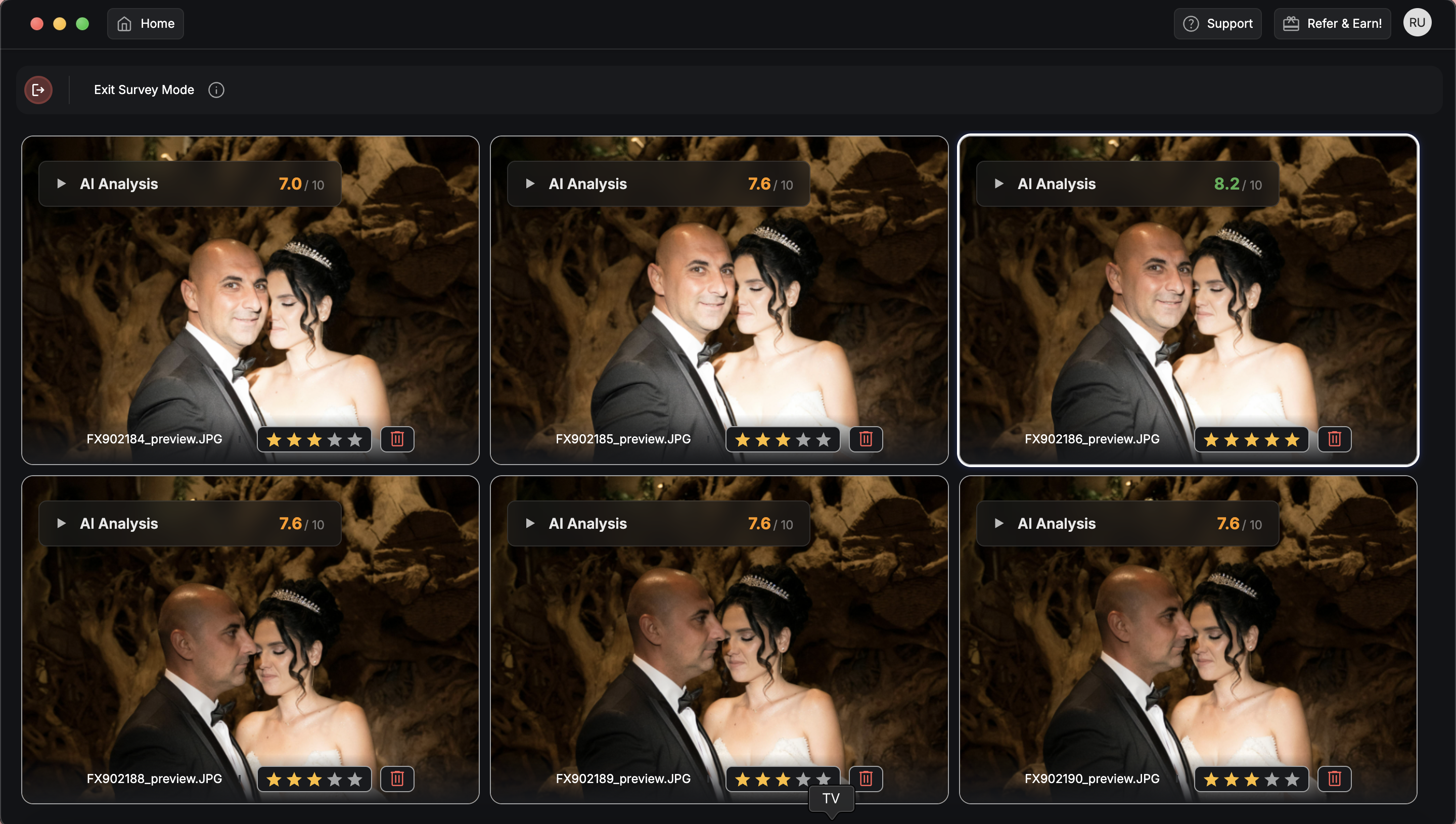
Basic Cull is the technical filter. It sweeps every frame for focus, exposure, eyes-closed, and duplicates. It's fast and genre-neutral. For a wedding photographer's first technical pass — clearing the obvious misfires, soft frames, and test shots — Basic Cull is genuinely enough and very quick.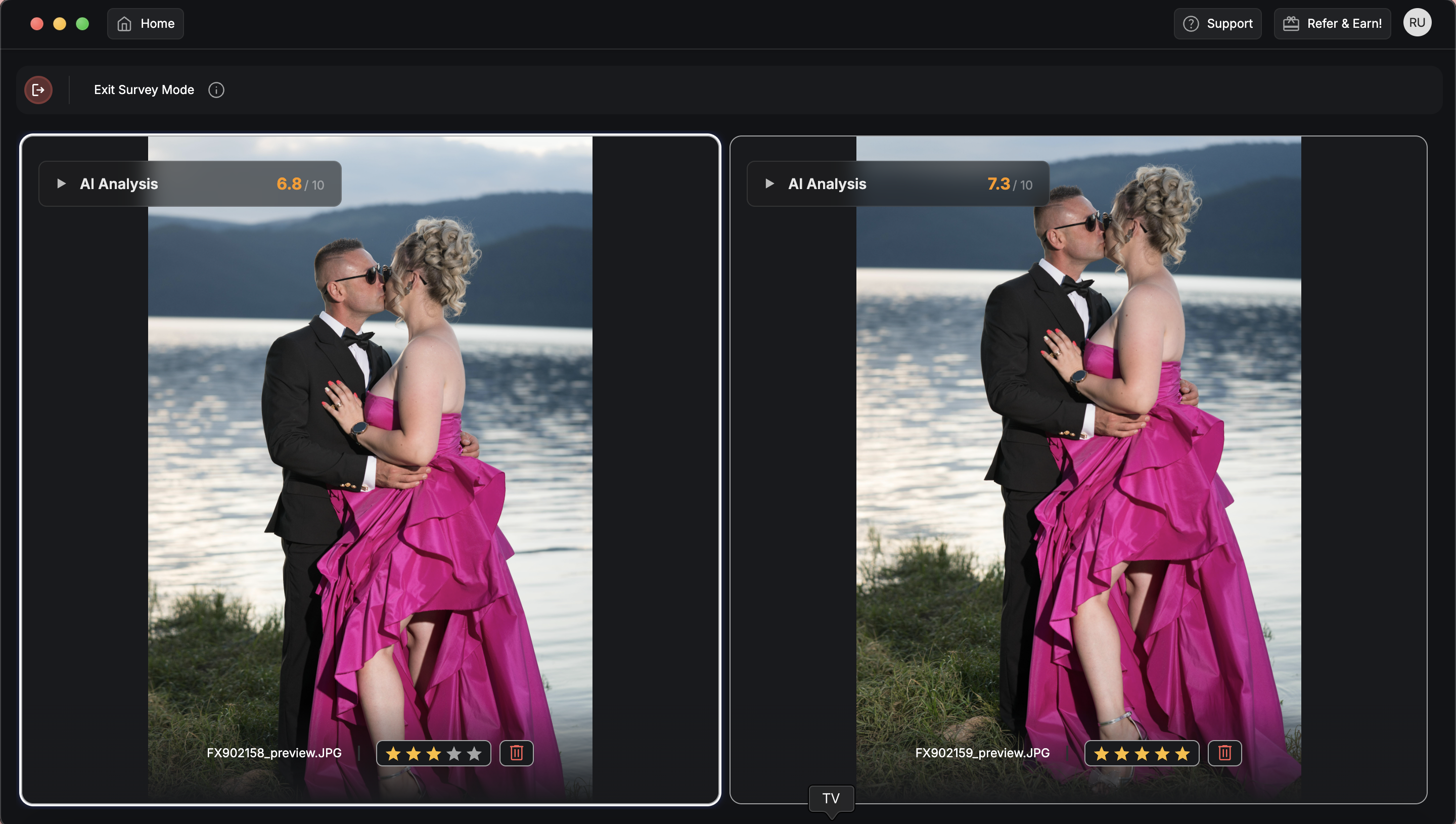 DeepCull is the genre-aware mode. It understands that a wedding photo and a sports photo have completely different definitions of "good." For weddings, DeepCull is tuned for the things that actually decide a wedding keeper: genuine expression, eyes-open across every face in a group, the emotional peak in a sequence, and the best single frame from a set of similar ones. It scores each photo across the genre's parameters and returns a Score & Reason for every call.
The practical rule: run Basic Cull if you only want the technical junk gone and you'll do all the selection by eye. Run DeepCull when you want the tool to also rank expressions and surface the keeper from each cluster — which is where the real time savings on a wedding live. Everything below assumes DeepCull.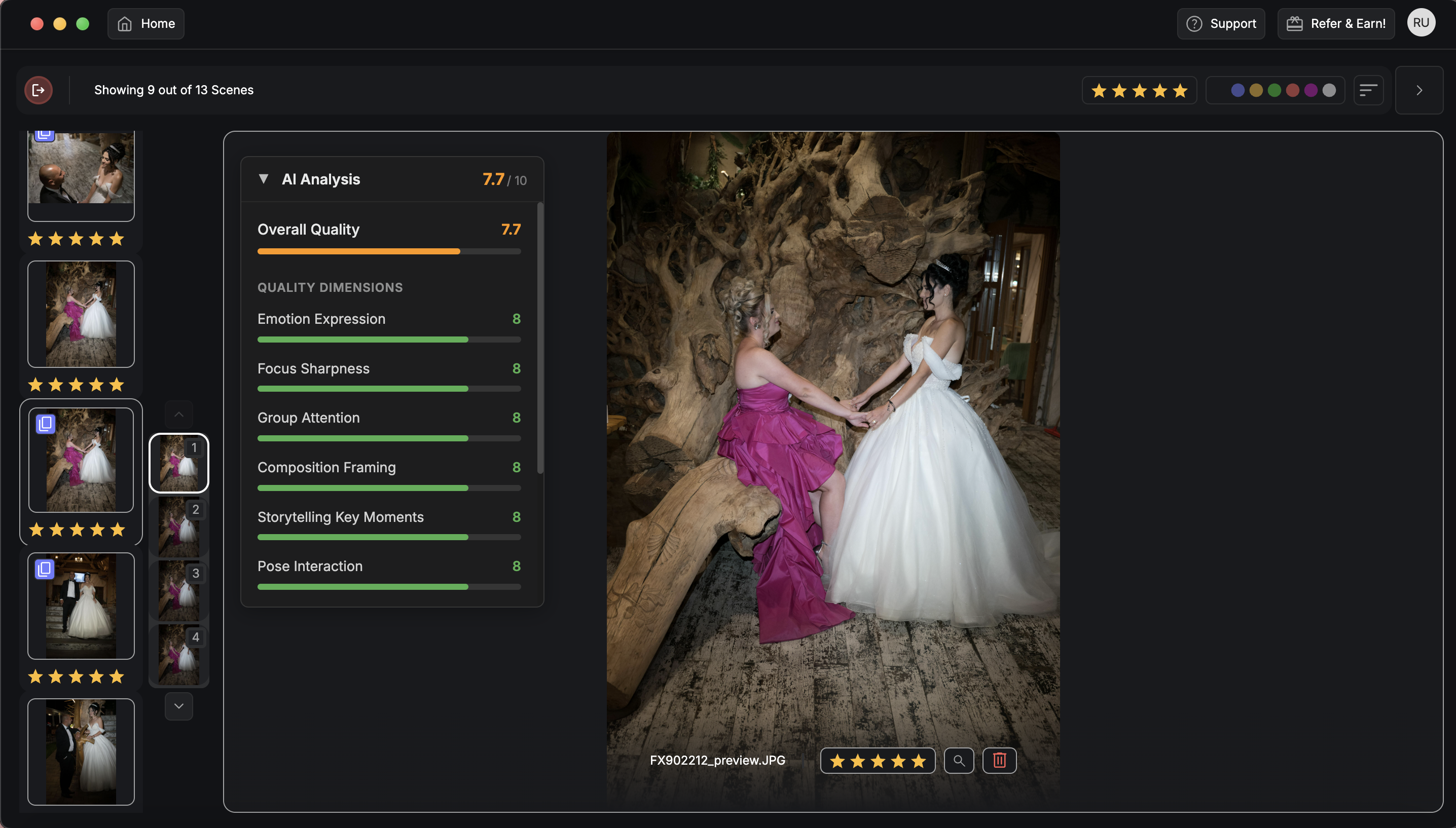
What Makes a Wedding "Keeper" (And Why Generic AI Misses It)
Generic culling tools fail at weddings because they evaluate frames in isolation and score for technical cleanliness alone. But across a sequence of twelve frames during the vows, several are tack-sharp and well-exposed and only one has the half-laugh-half-cry expression that is the photo. Technical scoring ranks them all about equally. Expression scoring doesn't.
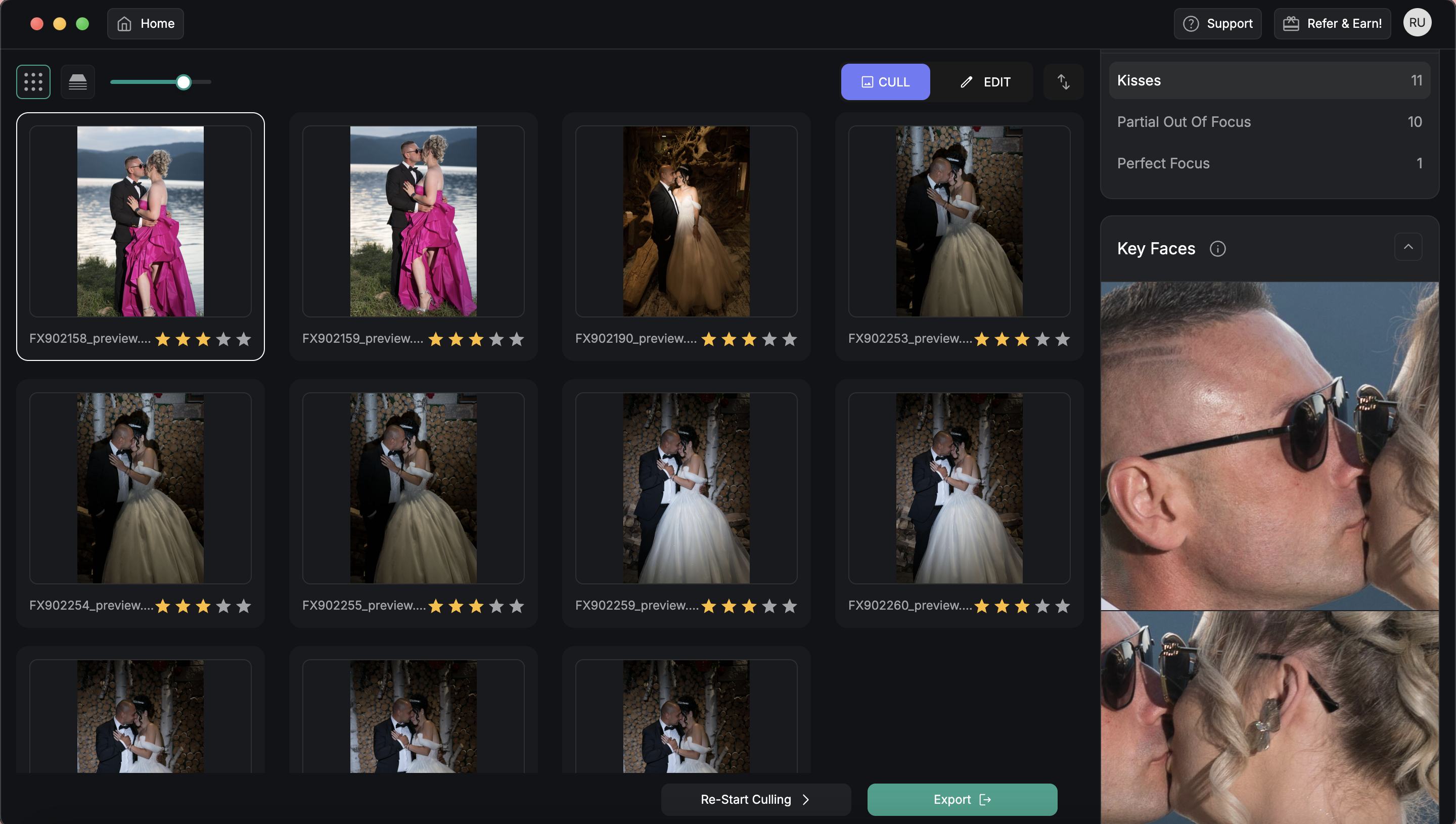
What DeepCull actually evaluates on wedding frames:
- Eyes and expression, per face. Not just "eyes open" as a yes/no, but which frame in a set has the most genuine, legible expression and in group shots, which frame has the most faces working at once.
- Focus on the couple. A pin-sharp floral arch with a soft couple is a reject at a wedding, even though it's technically "in focus." DeepCull weights focus on the subjects of intent.
- Emotional peak in a sequence. The tear during the toast, the reaction at the first look, the laugh mid-speech. DeepCull ranks the peak frame above the lead-in and follow-through.
- Best-of-cluster selection. From eight similar frames of the same moment, it surfaces the top one to two and demotes the rest, so you compare a shortlist instead of all eight.
- Detail-shot quality. Rings, dress, stationery, and decor get evaluated for sharpness and composition rather than expression, different rules for different shot types.
This is the difference between DeepCull and a generic quality filter: it tells you why a frame ranked where it did, so when you're choosing between two near-identical first-kiss shots, the reasoning is on the table instead of in your head.
The Wedding Culling Workflow That Actually Works (Step-by-Step)
This is the workflow we'd give a wedding photographer running FilterPixel with DeepCull through a real wedding, assuming next-morning sneak peeks and a full gallery inside the contracted turnaround.
Sneak peeks reach the couple. Wedding photo sharing with face recognition reaches every guest while the celebration is still going.
Our guide to QR code photos for weddings covers the setup and the costs.
Step 1: Ingest With Speed in Mind (10–15 min)
Get files off the cards and onto a working drive the moment you're home — or in the car between venue and reception if you shoot a second card. The classic mistake is starting to cull while files are still copying; every read slows the transfer.
- Use a reader rated at your card's real write speed
- Copy to a working SSD first, backup drive second
- Skip 1:1 previews on import use embedded previews so frames load instantly
- Don't format cards until both copies verify
A consistent folder structure pays for itself when a couple emails eight months later asking for "that one from the cocktail hour." We recommend Year > Couple_Date > Card/Shooter.
Step 2: Run DeepCull on the Full Set (5–8 min)
Load the entire import into FilterPixel and select DeepCull. Running it on the whole set before any manual scanning is counterintuitive, but it's where the time is won:
- Near-identical clusters collapse to a representative shortlist
- Out-of-focus, motion-blurred, and eyes-closed frames get flagged
- The set you actually review drops to roughly 30–40% of the original volume
- Every surviving frame carries a Score & Reason, so you trust what stayed and what was cut
You're not handing the couple's memories to an algorithm. You're letting DeepCull clear the test shots, the blinks, and the seventh-best frame of every cluster so your attention goes to real selection calls.
Step 3: Moment-by-Moment Selection (20–30 min)
This is where your eye does the work. Walk DeepCull's shortlist in the order the day happened, moment by moment, comparing the one to two frames it pulled from each cluster.
For each cluster, ask:
- Is the couple's eye sharp — not just the dress or the background?
- Is the expression genuine and legible — real laugh, real tears, not mid-blink?
- In group shots, is this the frame where the most faces landed?
- Is there a frame DeepCull demoted that you'd keep because you were there and know it mattered?
That last question is the human one. DeepCull is excellent at technical and expression scoring; narrative context — the frame where grandma's reaction in the background outweighs the couple's pose — is still your call, and the Score & Reason output usually surfaces those edge cases for you to override.
Step 4: Build the Story, Not Just the "Best Of" (10–15 min)
A wedding gallery is a narrative, not a greatest-hits list. As you confirm selects, tag for the deliverables you owe:
- Sneak peek (next morning): 15–30 frames that hit every chapter — prep, first look, ceremony, a portrait, the party
- Full gallery: the curated story across the whole day, typically 600–1,000 frames
- Album shortlist: your 60–80 strongest for the design conversation
Color labels move faster than star ratings here (e.g. red = sneak peek, blue = album, no label = gallery).
Step 5: Batch Edit for Consistency (15–30 min)
Wedding editing across a single day shares lighting zones — prep room, ceremony light, golden-hour portraits, reception flash. Edit one representative frame per zone, then sync. Cull first, edit second, never in parallel: adjusting a frame you're about to cut is the biggest avoidable time-sink in wedding post.
Step 6: Deliver Before the Excitement Cools
Next-morning sneak peeks are the standard that wins referrals. Full gallery inside your contracted window, always. Use a gallery host with fast mobile rendering; couples open on phones first. Total time on a 4,000-frame wedding with DeepCull: roughly 60–90 minutes. Manual-only on the same volume runs 4–6 hours done properly.
How FilterPixel Fits a Lightroom-First Wedding Workflow
Most wedding photographers will keep Lightroom Classic at the center of editing and album design, it's still the best catalog and develop tool when used for what it's good at. FilterPixel doesn't replace Lightroom; it sits in front of it as the high-volume culling layer Lightroom was never built to be.
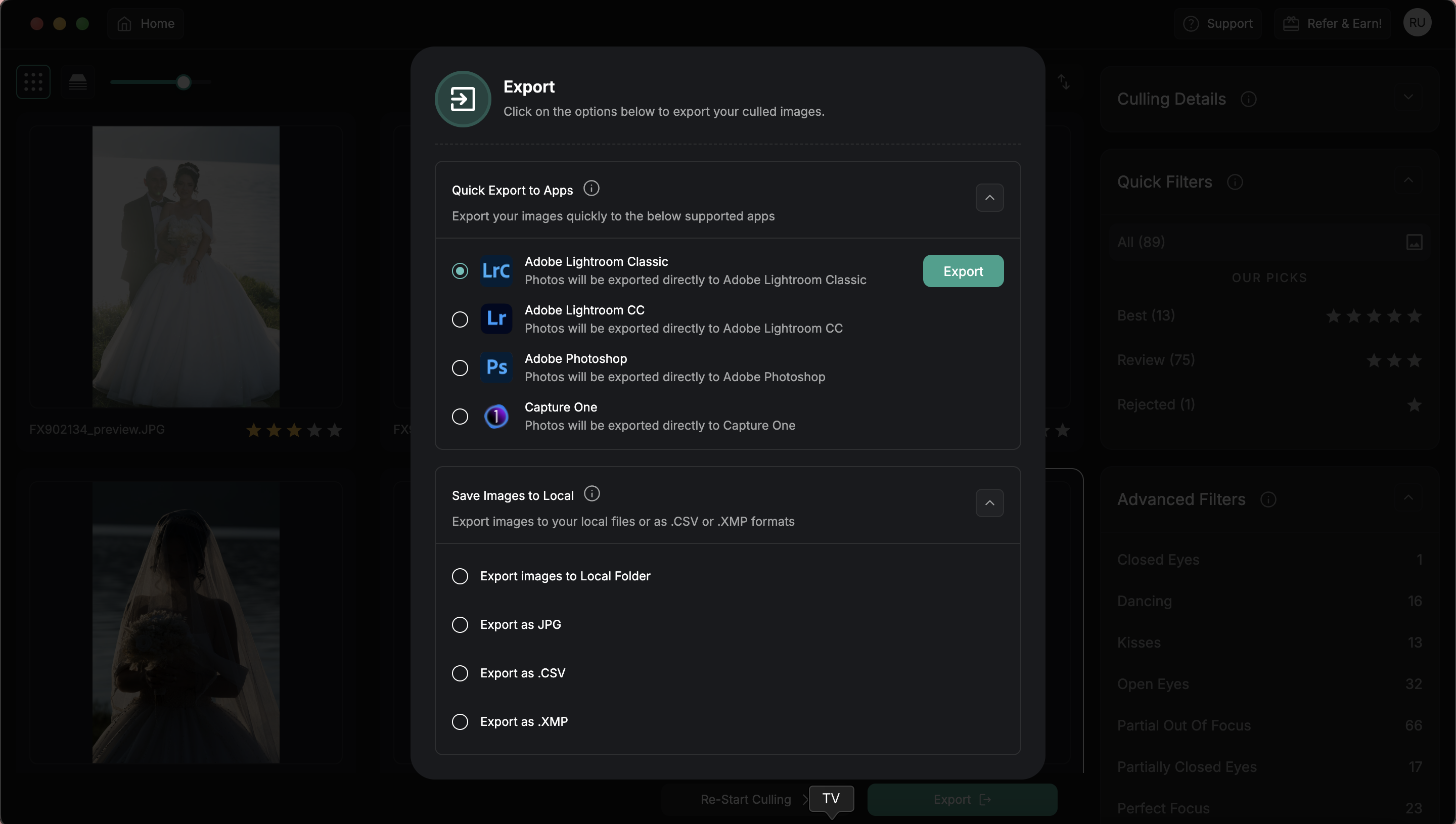
The integration that works:
- Cull in FilterPixel first with DeepCull. Don't import 4,000 raws to Lightroom yet — catalog bloat across a season is real.
- Export selections as flagged frames. FilterPixel writes ratings into XMP sidecars Lightroom reads natively.
- Import only the keepers to Lightroom. Convert to DNG here if you want to trim catalog size further.
- Apply your presets and edit by lighting zone.
- Design, keyword, and deliver from Lightroom — the things it's genuinely best at.
**Remember, the mistake is dumping the full card into Lightroom and culling there.
Moment-by-Moment: What Changes in the Cull
Generic culling advice flattens the wedding day into one task. In practice, each chapter has its own keeper grammar..png?width=1280&height=720&name=youtube%20banners%20(1).png)
Getting Ready & Details
Details (rings, dress, invitation suite, shoes) are culled on sharpness, styling, and composition — not expression. Keep tight variety, cut the redundant angles. For prep candids, prioritize genuine in-between moments over posed ones.
First Look & Couple Portraits
Reaction beats pose. The keeper in a first look is the unguarded second — the inhale, the hand to the mouth, not the clean smile that follows. In portrait sets, pick for connection and eye sharpness, then keep a small spread of poses, not ten variations of one.
Ceremony
The processional, the vows, the ring exchange, the kiss. These are emotional-peak sequences: DeepCull ranks the peak frame, but check that the couple is sharp and the officiant or guests aren't blocking the line. The kiss is usually a short burst — pick the cleanest frame where both faces read.
-1.png?width=1350&height=270&name=BLOG%20DRAFTS%20(17)-1.png) Learn how to deliver the preview gallery the same night with FilterPixel. Read here.
Learn how to deliver the preview gallery the same night with FilterPixel. Read here.
Family & Group Formals
The hardest cull of the day and where DeepCull saves the most time. Across many faces, you need the one frame with the most eyes open and expressions working. Manually this means zooming face-by-face; DeepCull's per-face evaluation surfaces the best frame from each formal so you confirm rather than hunt.
Reception
First dance, speeches, candids, dancing, exit. Speeches and reactions are emotional-peak culls (the toast tear, the laugh). Dancing is closer to event culling for the motion, energy, expression over technical perfection. Cut the dark, half-frame misfires fast and keep the ones with genuine energy.-1.png?width=1350&height=270&name=BLOG%20DRAFTS%20(15)-1.png)
Camera Settings That Make the Cull Easier (Or Harder)
Most culling pain starts in-camera:
- Eye-detection AF. Non-negotiable for fast expression work; soft-eye frames are the most common avoidable reject.
- Burst with restraint. Burst the kiss, the confetti, the bouquet toss, the first-look turn. Don't hold the shutter through static posed portraits — it just multiplies the cull.
- RAW + small JPEG. Pull JPEGs for next-morning sneak peeks while raws ingest for the full gallery. Highest-ROI change for deadline turnaround.
- Consistent exposure per zone. The closer your frames are in-camera, the faster batch editing syncs after the cull.
What to Look For in a Wedding Culling Tool
Not every culler is built for the wedding cull. Before you commit to one, check it against the four things that actually decide whether it saves you time on a wedding:
- Genre-aware expression scoring, not just a technical pass. Focus-and-exposure filtering is table stakes. What separates a fast wedding cull from a slow one is whether the tool can rank expressions and surface the best frame from a cluster of near-identical moments.
- Per-face evaluation on group shots. The family-formal blink lottery is where weddings eat hours. The tool should tell you which frame has the most eyes open and expressions working — automatically.
- Speed at volume. A 4,000-frame wedding shouldn't take half an hour just to process. If the first AI pass is slow, the deadline math never works.
- Transparency you can trust. A score with no reasoning makes you re-check everything by hand, which defeats the point. FilterPixel's DeepCull returns a Score & Reason for every frame, so you confirm calls instead of second-guessing them.
The honest test, whatever you're evaluating: run it on a wedding you've already culled by hand. Compare its top 800 to your top 800. Above 80% overlap means it fits your eye; below 70% means you'll fight it. That's the only benchmark that matters — test FilterPixel on your own catalog and run exactly that comparison.
Common Mistakes That Cost Wedding Photographers Hours
Keeping frames because the moment was emotional. The memory is yours; the gallery is the couple's. Cut for the viewer who wasn't there.
Editing before culling. Adjusting exposure on frames you'll reject is the biggest avoidable waste in wedding post. Cull first, always.
Reviewing every frame of a cluster. If you shot eight frames of the kiss, you don't need to study all eight. DeepCull surfaces the top one to two; override only when context demands it.
Hunting blinks manually in group shots. Zooming face-by-face across every formal is hours you don't need to spend. Per-face evaluation is exactly what genre-aware culling is for.
Over-delivering a bloated gallery. Two thousand frames doesn't impress a couple, it overwhelms them and dilutes your best work. A tight, curated story is more valuable than volume.
Waiting days to start. The cull is faster within 24 hours, while you still remember which moments mattered and which clusters to favor.
How to Know Your Wedding Workflow Is Working
The metrics that matter, in order:
- Time from last frame to sneak peek delivered. Target: next morning.
- Time from wedding to full gallery delivered. Target: comfortably inside your contracted window, every time.
- Referral and repeat rate. Couples refer photographers who deliver fast and curate well.
- Selection regret. How often you wish you'd picked a different frame from a cluster. Target: under 5%.
If 1 and 2 are slipping, the bottleneck is almost always the cull, not editing or delivery. That's the number DeepCull exists to fix.
Getting Started Without Overhauling Everything
Don't rebuild your workflow on a paid wedding. Instead:
- Pick a wedding you've already culled manually — you know the answer key.
- Run FilterPixel in DeepCull on the full raw set. Compare its picks to yours.
- Where it picked frames you missed, study why — real lessons.
- Where it missed frames you kept, study why, the cases you'll always catch by hand.
- On the next wedding, run DeepCull first, then your eye. Time the difference.
FilterPixel is free to test on your own catalog - no credit card, full DeepCull access on your first session. The honest test is your own wedding, not a demo.-1.png?width=1350&height=270&name=BLOG%20DRAFTS%20(16)-1.png)
Wedding Culling FAQs
How long should it take to cull a wedding? A 4,000-frame wedding run through FilterPixel in DeepCull mode takes about 60–90 minutes including review and tagging for sneak peek, gallery, and album. Manual-only on the same volume runs 4–6 hours done properly.
How many photos should I deliver from a wedding? Most photographers deliver 600–1,000 final images from 3,000–5,000 shot, depending on coverage hours and whether you had a second shooter. The goal is a complete story, not every usable frame — a tighter gallery makes your best work hit harder.
Should I use Basic Cull or DeepCull for weddings? Basic Cull is a fast technical sweep (focus, exposure, eyes-closed, duplicates) and is fine for a first pass. DeepCull adds genre-aware expression scoring, best-of-cluster selection, and Score & Reason — which is where the real time savings on a wedding come from. For the full cull, use DeepCull.
How do I handle family photos where someone always blinks? This is the slowest manual task in weddings and the biggest reason to use genre-aware culling. DeepCull evaluates expressions per face and surfaces the frame in each formal with the most eyes open and expressions working, so you confirm a top pick instead of zooming through every face in every frame.
Should I cull in Lightroom or FilterPixel first? FilterPixel first, then Lightroom for editing, album design, and archive. Lightroom isn't built for high-volume initial review — using it to cull 4,000 raws is where most photographers lose hours.
How do I cull fast without losing the storytelling shots? Let the AI clear the technical rejects and burst-style clusters, then spend your saved time on narrative selection — reactions, in-between moments, and the frames you remember from the day. The Score & Reason output flags edge cases so you can override where context matters.
How soon should I deliver wedding sneak peeks? Next morning is the standard that drives referrals — the couple and their guests are still in the moment, and that's when galleries get shared. Shoot RAW + small JPEG so you can pull a sneak peek immediately while the raws ingest.
What's the difference between wedding culling and sports culling? Wedding culling is variation-heavy — meaningfully different frames, fewer true duplicates, with expression and emotion driving the keeper. Sports culling is burst-heavy — thousands of near-identical frames with dramatic differences between keeper and reject inside each burst. Tools tuned for one don't automatically work for the other, which is why DeepCull is genre-aware rather than one-size-fits-all.