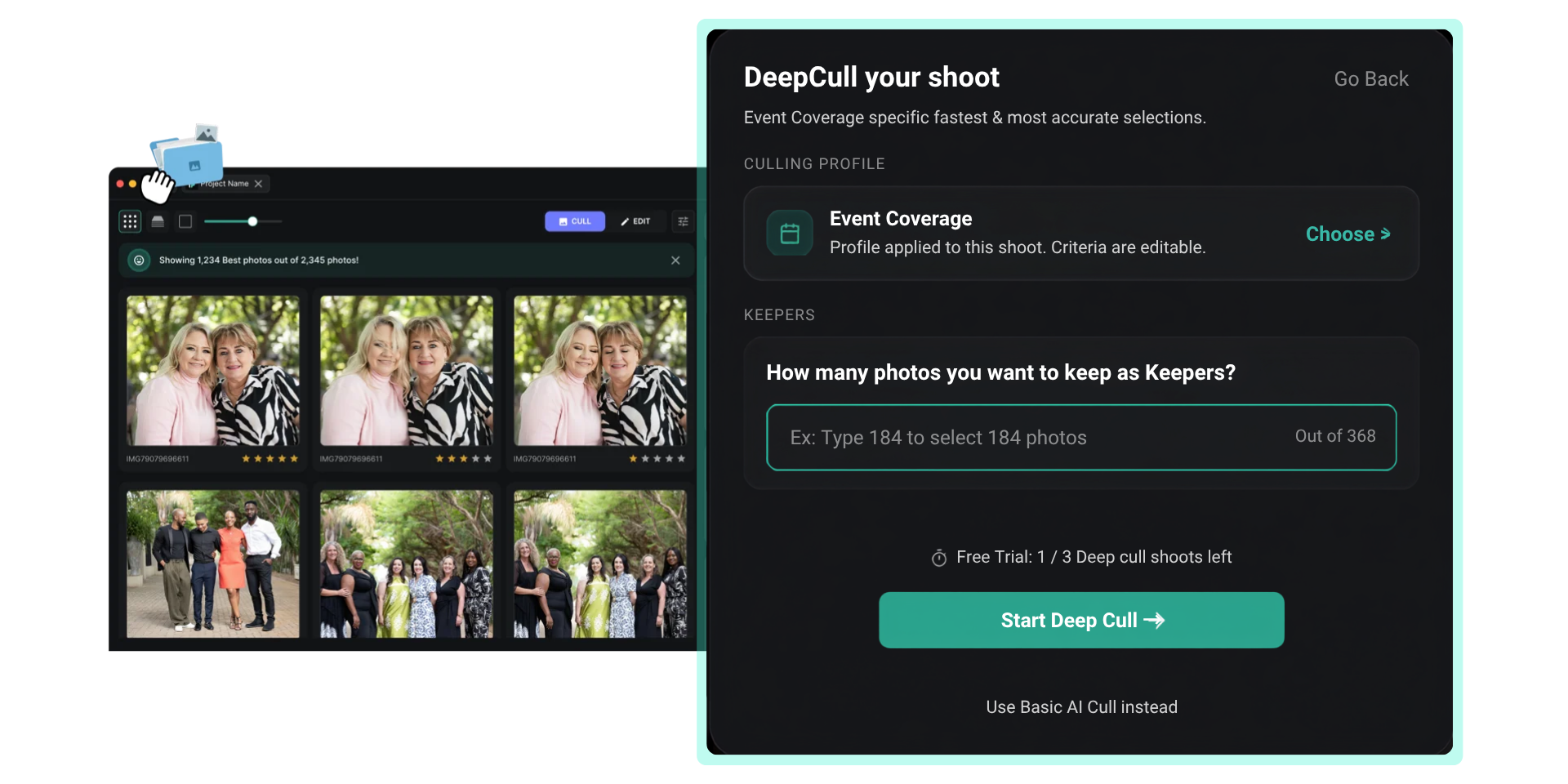
.png)


Capturing 2,000 images at a wedding is standard, but spending four hours selecting 400 isn't practical. AI photo culling software using machine learning to automatically evaluate, rank, and discard photos based on quality which has become essential for photographers who need to deliver fast without sacrificing creative control.
Not all culling tools work the same way, and not all are built for every genre. A tool that excels for wedding photographers might fall short for sports or corporate events. This guide breaks down how AI culling works, what to look for, and how photographers are actually using these tools in 2026.
How AI Photo Culling Works
AI photo culling is an automated process that reviews an entire image set, scoring and ranking photos through algorithms trained on sharpness, exposure, facial expression, and composition. Instead of manually clicking through thousands of frames, the software surfaces your best shots in minutes.
The technology evaluates every image for technical quality — blur detection, exposure accuracy, duplicate identification — and sorts them before the photographer even opens the gallery. Professional photographers report cutting their culling time by up to 90%, turning what used to be a four-hour task into a three-minute process.
What AI Evaluates in Each Photo
- Sharpness — checks focus quality across the frame and specifically on faces
- Exposure — flags under/overexposed images
- Composition — evaluates framing and subject positioning
- Duplicates — groups similar shots from burst sequences
- Facial expression — detects closed eyes, blinking, and unflattering expressions
AI Photo Picker: Finding the Best Frame From Every Burst
After the initial sort, the real challenge is picking the single best frame from a burst sequence. Continuous shooting at 10-20 fps during a first dance or a keynote speech produces dozens of near-identical shots. Reviewing each one manually is where photographers lose the most time.
AI culling handles this by comparing sharpness, exposure, expression clarity, and composition across every frame in a sequence, then surfacing the strongest image. This frame selection process is what separates basic sorting tools from professional-grade AI photo culling software.
The result is a clean selection ready for editing — no second-guessing, no missed shots buried in a burst of 40 frames.
From Capture to Delivery in Minutes
Speed matters most when clients are waiting. Conference organizers need social media highlights before the closing session. Sports leagues want game-day galleries posted the same evening. Wedding clients expect a preview before they leave the reception.
AI-powered culling compresses the entire selection pipeline. Once the software identifies the best frames, photographers can export directly into Lightroom, Capture One, or client gallery platforms without manual file reorganization.
Why One-Click Export Matters
For event photographers delivering same-day, the export step is where fragmented workflows break down. Moving files between culling software, editing apps, and gallery platforms eats time that should go toward actual editing. A streamlined export pipeline from AI selection to client-ready gallery — eliminates that bottleneck entirely.
A Unified System vs. Disconnected Tools
Photography workflows don't lack tools — they suffer from too many disconnected ones. Photographers often juggle separate apps for culling, editing, color grading, and delivery. Each handoff between tools introduces friction, file management overhead, and the risk of losing selects.
A unified culling platform changes this by combining sharpness detection, duplicate removal, facial recognition, and export into one process. Time saved in one step doesn't get lost in another.
Face Sharpness Detection
This is the feature that earns long-term loyalty from high-volume photographers. AI-driven face sharpness detection checks focus quality specifically on human faces — flagging soft or blurred portraits for rejection. At weddings, corporate events, and sports shoots, a missed soft face means a missed moment. Tools that nail this consistently become indispensable.
Genre-Specific AI Culling
Not every shoot has the same culling criteria. A wedding photographer prioritizes emotion and connection. A sports photographer needs peak action and sharp motion. A corporate event photographer needs professional expressions and stage coverage.
The best AI culling tools adapt to these differences rather than applying a one-size-fits-all algorithm. Genre-specific models like DeepCull are trained on the patterns unique to each shooting style, producing more accurate selections than general-purpose AI.
How Culling Differs by Genre
| Genre | Primary Culling Criteria | Typical Volume |
|---|---|---|
| Weddings | Emotion, face sharpness, group composition | 2,000–4,000 images |
| Sports | Peak action, motion sharpness, burst selection | 3,000–8,000 images |
| Corporate Events | Professional expressions, stage coverage, branding | 1,500–3,000 images |
| Concerts | Lighting accuracy, performer focus, crowd energy | 1,000–2,500 images |
Is Anyone Actually Using AI Culling Software?
Photographer communities — from Reddit threads to Facebook groups consistently confirm the same thing: once photographers switch to automated culling, they rarely go back to manual methods.
The shift is driven by practical frustration. After a wedding or corporate event, photographers face 2,000+ raw files to sort manually. That's hours spent on repetitive clicking instead of editing, client communication, or booking the next job.
The learning curve is shorter than most expect. Photographers trying AI culling tools typically integrate them into existing workflows within a session or two. The software doesn't replace a photographer's creative eye — it eliminates the repetitive groundwork so you can focus where it actually matters.
Which Culling Tool Is More Affordable?
Price is a real factor when comparing AI culling to manual workflows or bundled editing subscriptions. Most tools use either subscription-based or per-image pricing:
- Subscription plans — monthly fee covering unlimited or tiered image counts
- Per-image pricing — pay based on the number of photos processed
- Bundled packages — culling + editing combined at a discount
For photographers handling hundreds of images per session, AI culling typically pays for itself in time saved within the first month. The key is separating culling costs from editing costs evaluate each function independently to avoid paying for overlap.
What Photographers Actually Prefer
Community discussions reveal a clear pattern: the most popular culling tool isn't always the most advanced — it's the one that reliably handles face sharpness detection and integrates cleanly into existing workflows.
Photographers at high-volume events — weddings, sports, corporate shoots favor tools where face detection is both accurate and fast. Many switch not because of cost, but because their previous tool missed soft faces, forcing manual double-checking that defeats the purpose of AI.
The community splits into two camps:
- Deep catalog integration for photographers who want culling tightly coupled with Lightroom or Capture One
- Standalone speed for photographers who want the fastest possible cull before importing into any editor
Mac vs. Windows Compatibility
Not all culling tools are fully optimized for macOS. Performance varies depending on whether software runs natively on Apple Silicon or through compatibility layers. The best Mac-compatible options offer native desktop applications, smooth Finder or Lightroom integration, and stable performance on both Intel and M-series chips.
Cloud-based culling tools sidestep hardware concerns entirely since processing happens server-side. For Mac photographers, the deciding factor is often workflow integration — how seamlessly the tool connects with existing photo management software.
How to Choose the Right AI Culling Tool
When professional photographers recommend culling software, no single tool dominates — which is actually a good sign. The right choice depends on your shooting volume, editing ecosystem, and the balance between speed and control.
Key Factors to Evaluate
- Volume capacity — can it handle 5,000+ images without slowing down?
- Genre accuracy — does the AI understand your shooting style?
- Integration — does it connect to Lightroom, Capture One, or your gallery platform?
- Export workflow — one-click export or manual file management?
- RAW support — native processing for CR3, NEF, ARW, RAF?
- Face detection quality — the single feature that determines long-term satisfaction
The best AI photo culling software isn't the one with the most features — it's the one that fits seamlessly into your workflow. Start with a free trial, test it on a real shoot, and let the results decide.
Key Takeaways
- AI culling cuts selection time by up to 90%, turning hours of manual sorting into minutes
- Face sharpness detection is the feature that matters most for high-volume photographers
- Genre-specific AI models outperform general-purpose algorithms for weddings, sports, and events
- A unified culling platform eliminates the friction of switching between disconnected tools
- FilterPixel combines intelligent scoring, duplicate detection, and one-click export into a single workflow — try it free
Frequently asked questions
Is anyone using auto culling software?
Yes — automated culling has moved from novelty to standard practice among high-volume photographers. Around 14,000 photographers use FilterPixel, and the pattern is consistent: the higher your frame count per job, the sooner the manual approach stops scaling. Wedding, event, sports and conference shooters adopt it first because they are the ones routinely facing three to ten thousand frames with a delivery deadline attached.
Which AI culling tool is more affordable?
Not FilterPixel, if you are comparing entry prices alone. Aftershoot and Narrative Select both start around $10/month and Imagen sells a culling add-on at $12/month, against FilterPixel Standard at $14.99/month billed annually. What the entry price does not show is scope: FilterPixel includes unlimited basic culling, genre-specific DeepCull, AI editing and unlimited Instant Profiles in one subscription, where Imagen prices culling and editing separately and charges per photo for crop and straighten. Compare on the total for the work you actually do, not the headline.
What do photographers prefer in culling software?
Two things come up more than any other: speed on large imports, and being able to see why a photo was chosen. Speed is table stakes — an hour of culling is an hour not spent editing or delivering. Explainability is what determines whether the output is trusted at 2am with a morning deadline, which is why FilterPixel attaches a score and a written reason to every frame instead of returning an unexplained shortlist.
Does AI photo culling software work on Mac?
Yes. FilterPixel has a dedicated macOS application alongside Windows, and because DeepCull processing runs in the cloud, culling speed does not depend on your machine's hardware — a base-model laptop returns results at the same pace as a workstation. Selects export to Lightroom Classic and Capture One with star ratings intact.
Can AI culling replace manual photo selection?
It replaces the first pass, not the final call. AI reliably removes what is objectively unusable — out-of-focus frames, blinks, near-identical burst duplicates — and ranks what remains. The editorial judgement about which frame tells the story stays with you. The realistic outcome is that the pile you review personally shrinks from thousands of frames to hundreds, which is where the hours come back.