
-1.png)


You've just finished a 3-day medical conference. 4,200 RAW files across keynotes, breakout sessions, networking mixers, and sponsor activations are sitting in a folder on your desktop. The sponsor gallery needs to be delivered by 9am tomorrow. You open Lightroom Classic 15.3, toggle on Assisted Culling, and start watching the progress bar inch forward while your MacBook fan spins up to jet-engine levels.
This is the moment where the choice between Lightroom AI culling vs dedicated culling software stops being a theoretical debate and starts being a question of whether you sleep tonight or not.
Quick Answer
Which is better, Lightroom AI culling or dedicated culling software?
For deadline photographers handling 2,000+ images per shoot, dedicated culling software like FilterPixel's DeepCull outperforms Lightroom's Assisted Culling on three measurable fronts: it processes images faster through cloud architecture (~0.27 seconds per photo regardless of laptop specs), applies genre-specific AI models for sports, concerts, conferences, and weddings rather than a portrait-trained general model, and gives you a score plus written reason for every selection. Lightroom's Assisted Culling, still in Early Access as of May 2026, is built for portrait and people photography and Adobe itself notes it isn't yet ready for event photography.
- Cloud-based processing — same speed on any laptop, anywhere
- Genre-specific AI models (sports, concert, conference, wedding)
- Score & Reason transparency on every photo
- Free tier with one prject and upto 5,500 photos.
What Lightroom Assisted Culling Actually Is in May 2026
Let's start with what Adobe shipped, not what marketing says. Adobe released AI-Assisted Culling as part of Lightroom Classic version 15.0 in October 2025, and has iterated through 15.2 (February 2026) and 15.3 (April 2026).
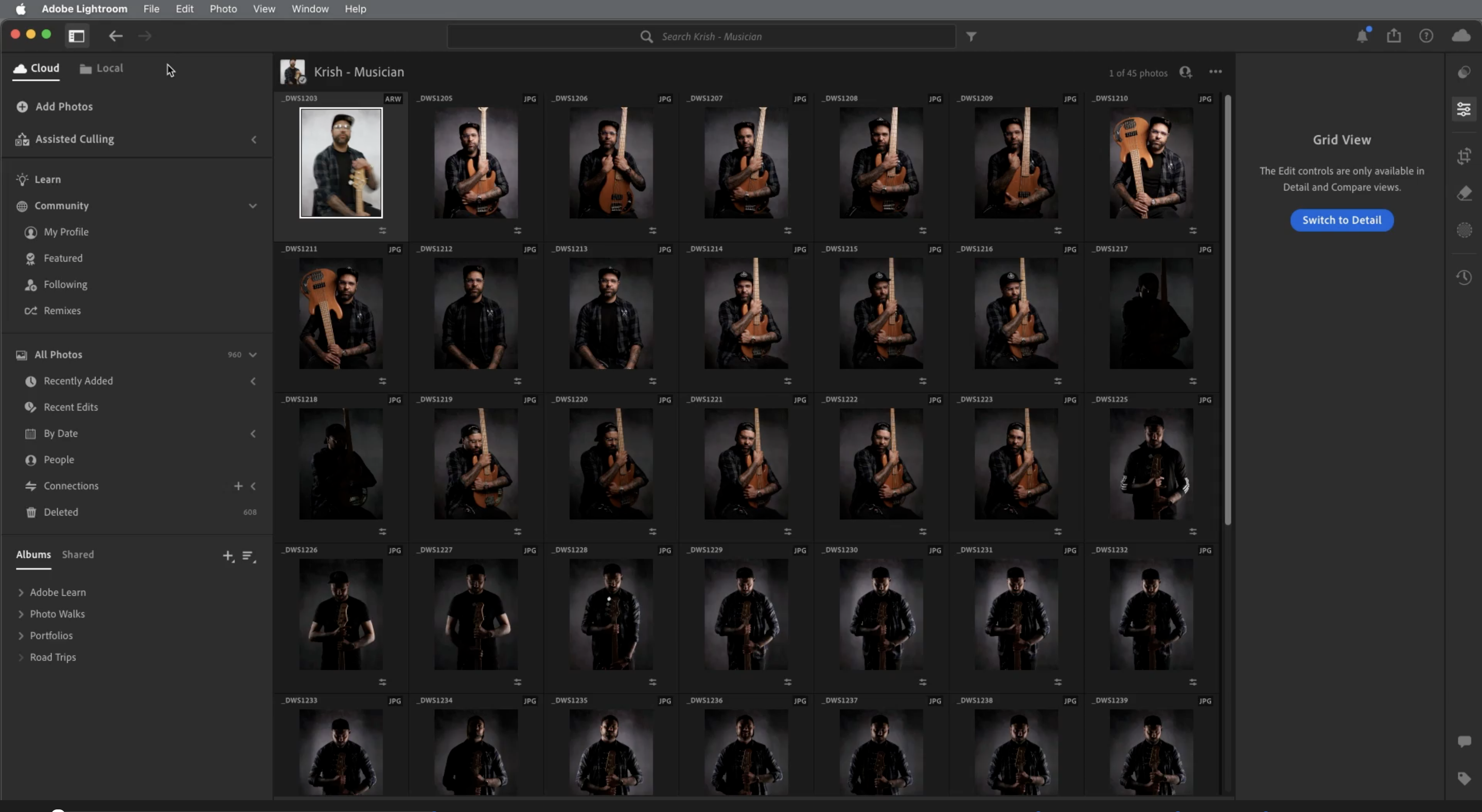
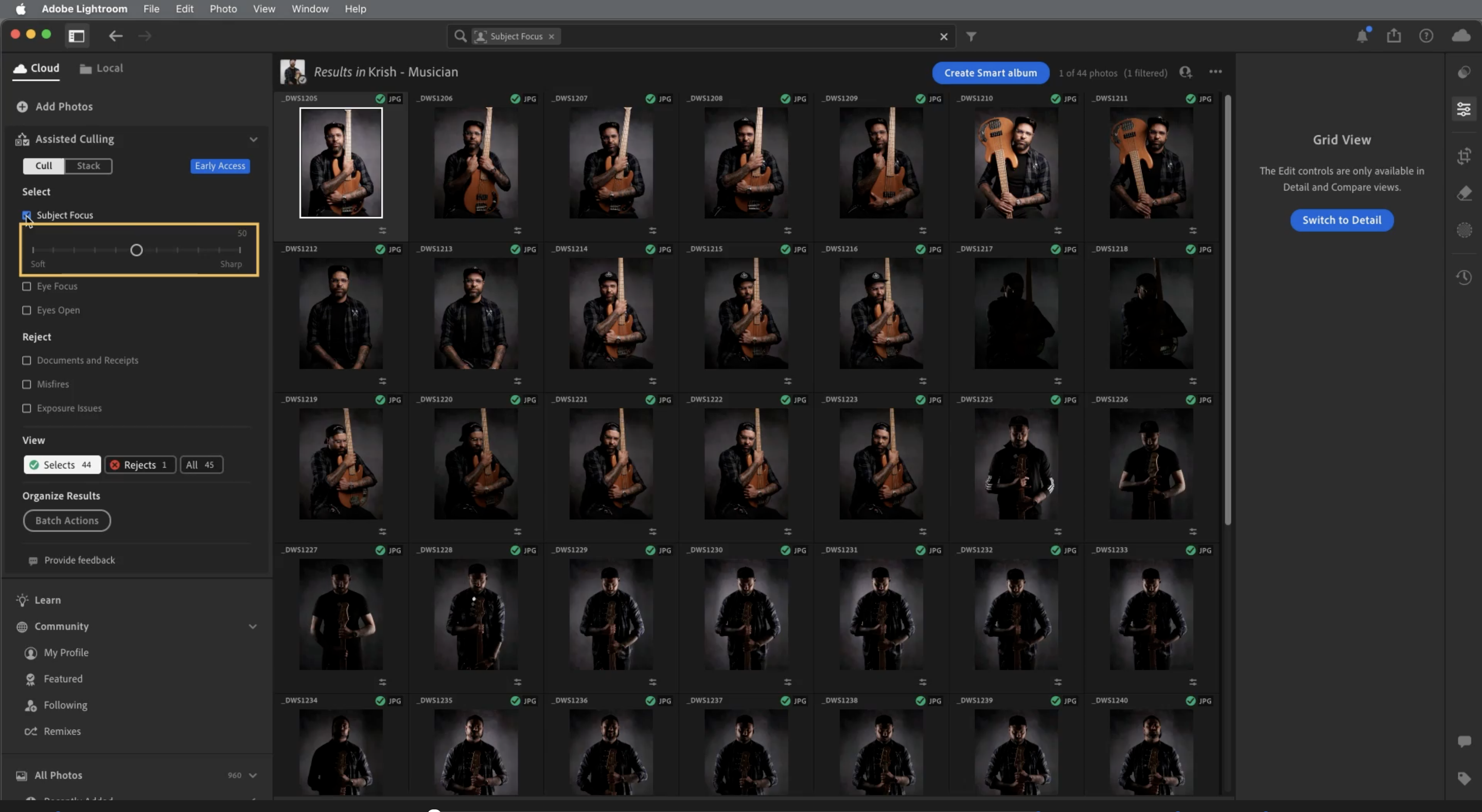
Here's exactly what the current version does:
Select options — Subject Focus (chooses images with the subject in focus), Eye Focus, and Eyes Open
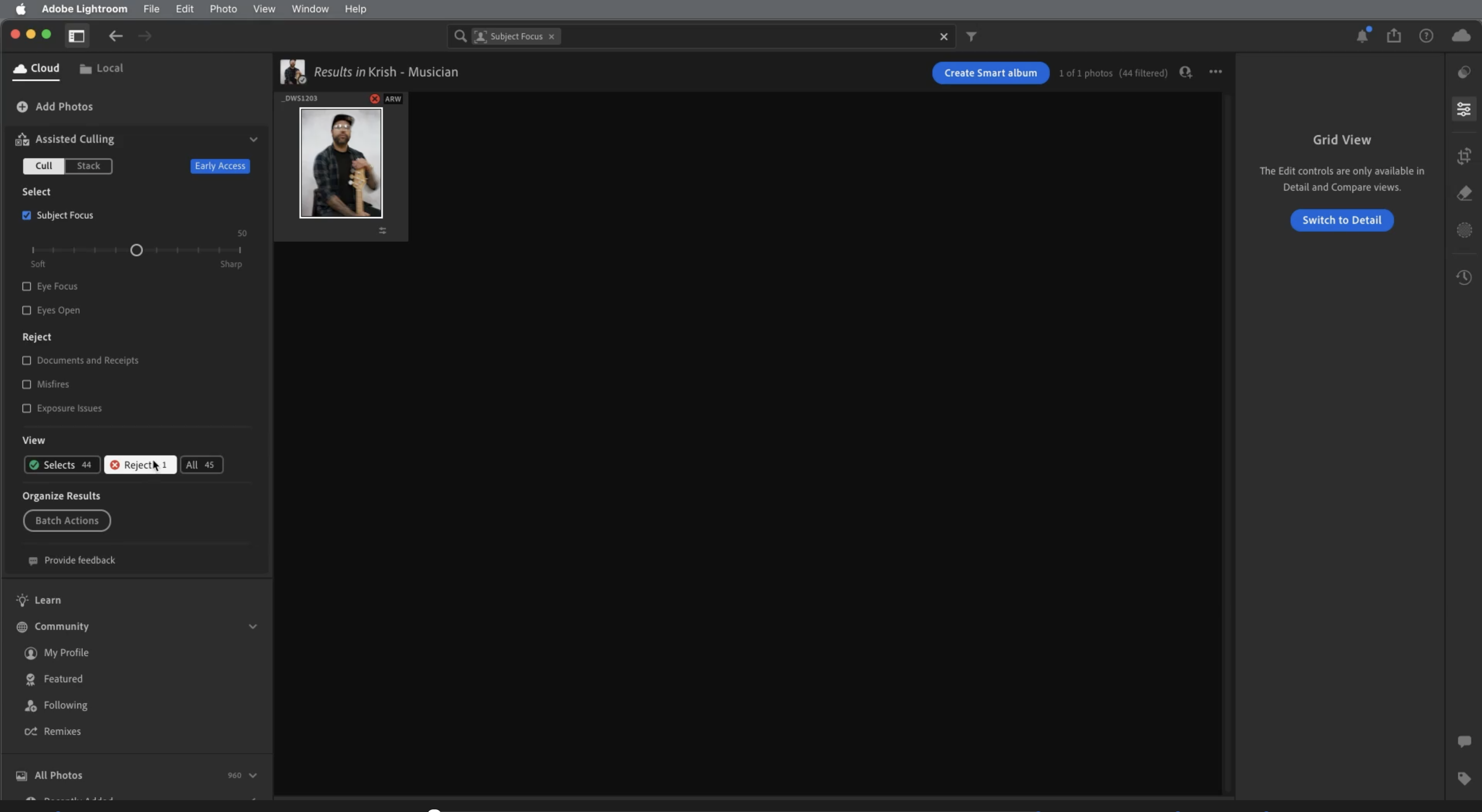
Reject options — Documents and receipts, Misfires (accidentally captured frames), and Exposure issues
Auto Stack — groups photos together based on a given time interval or their visual similarity
Culling Scores panel — displays Subject Focus, Eye Focus, and Eyes Open values per image so you can see why something was rated a certain way
The Critical Limitation Adobe Warns You About
Buried in the early-access disclaimers is the line that decides whether this tool belongs in your event workflow at all. Lightroom Classic's Assisted Culling is explicitly designed for photos of people. And at the time of writing, with the tool in the Early Access phase, Adobe has noted that it's not yet good enough to be used for event photography.
Read that again. Adobe says their own tool isn't ready for event photography. If you shoot weddings, conferences, sports, or concerts, Adobe is telling you that the AI culling baked into your Creative Cloud subscription is not the tool for your dedicated workflow.
What Dedicated Culling Software Does Differently
Dedicated culling tools don't try to be a photo manager, RAW editor, library system, and culling engine in one application. They do one thing, which means every product decision & the AI model, the processing architecture, the UI, the speed is optimized for the selection stage alone.
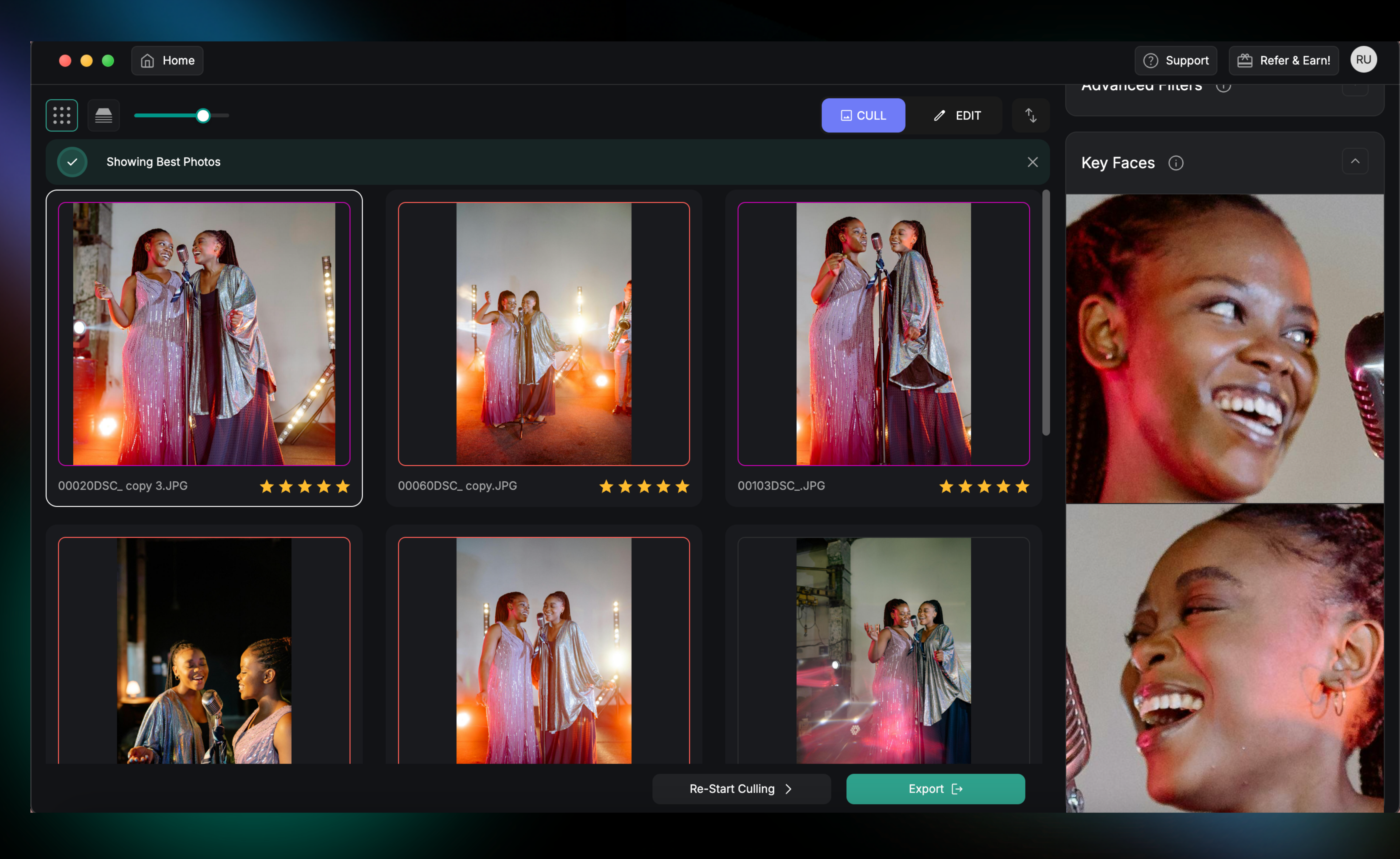
FilterPixel's DeepCull is the clearest example of what this specialization unlocks in 2026. Three things in particular are impossible inside Lightroom's current architecture:
1. Genre-Specific AI Models, Not One General Model
Lightroom's Assisted Culling applies the same model to every shoot type. It's a portrait-trained model with sliders for sharpness and exposure. When you import sports, concerts, or conferences, the model doesn't change — only your tolerance for what it flags changes.
DeepCull works differently. When you import photos into FilterPixel, you select your shoot type from a genre dropdown — Corporate Events, Sports, Concerts, Wedding, and more, and the AI loads a model trained specifically for that genre. A sports model knows that a slightly soft frame at the apex of a jump is worth more than a tack-sharp frame of the player walking back to position. A concert model treats LED stage lighting and smoke haze as the intended aesthetic, not technical defects. A conference model recognizes keynote gesture moments, audience reaction frames, and sponsor logo visibility as keeper criteria.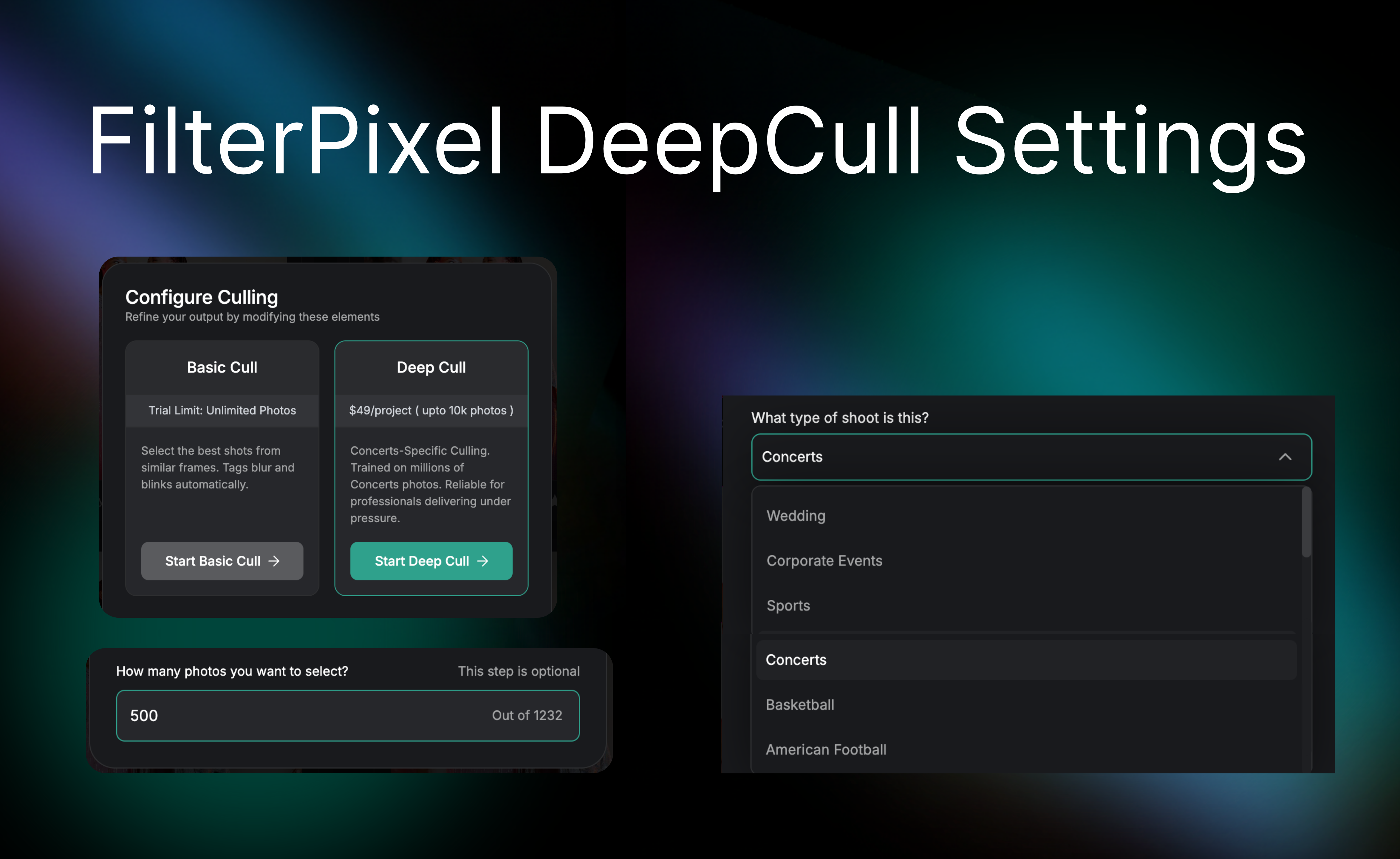 This isn't a marketing slogan. It's why a festival photographer using a general AI model ends up scrapping the selection and starting from scratch the AI selected sharp frames but missed the storytelling moments. A genre-specific model is trained on those moments by design.
2. Scoring on Every Photo
Lightroom shows you a Culling Score per criterion: Subject Focus, Eye Focus, Eyes Open — three numerical values per image. This is useful, but it's a technical breakdown, not an explanation. The score tells you the photo passed the eye-focus check; it doesn't tell you what makes the frame worth keeping.
DeepCull shows an AI Analysis score out of 10 on every thumbnail in Review and Survey Mode. Click into any image and the AI Analysis panel expands to show explicit reasoning.
.gif?width=1565&height=960&name=BLOG%20DRAFTS%20(4).gif)
3. Cloud Processing vs Local CPU Burn
This is where Lightroom's architecture starts costing you real time. On an M1 Mac Mini, the CPU temperature shot up to 74°C / 165°F while processing a batch of around 2600 photos in Lightroom's Assisted Culling. The tool runs locally and is, by the reviewer's own admission, resource-intensive even by Lightroom's notorious standards.
On a travel laptop in a press box or hotel ballroom, that thermal load translates directly to longer wait times. Your MacBook Air is not your studio iMac. Your deadline doesn't care.
DeepCull processes in the cloud. In our internal test on 1,232 concert photos, DeepCull finished in 5 minutes 28 seconds — roughly 0.27 seconds per photo — on the same machine where Aftershoot took 18 minutes 19 seconds running locally. The MacBook Air in the press box delivers the same culling speed as the studio workstation, because the culling isn't happening on the MacBook Air. Hardware stops being a deadline bottleneck.
The tradeoff is real: cloud processing requires internet. In a venue with reliable WiFi or a cellular hotspot, this is a non-issue. In a remote outdoor festival with no signal, local processing wins.
-2.png?width=4050&height=810&name=BLOG%20DRAFTS%20(4)-2.png)
The Head-to-Head Comparison
Here's the honest side-by-side on the dimensions that actually matter for deadline photographers.
| Dimension | FilterPixel DeepCull | Lightroom Assisted Culling |
|---|---|---|
| Status (May 2026) | Production, third-generation engine | Early Access since October 2025 |
| AI model | Genre-specific: sports, concert, conference, wedding | Portrait-trained general model; Adobe states not ready for event photography |
| Selection criteria | Composition, peak action, emotion, storytelling, technical quality | Subject Focus, Eye Focus, Eyes Open |
| Reject criteria | Blur, blinks, duplicates, burst inferiors, exposure | Documents/receipts, misfires, exposure issues |
| Transparency | Score out of 10 + written reason per photo | Three numerical sub-scores per photo |
| Processing | Cloud — consistent speed on any hardware | Local — CPU-intensive (74°C on M1 Mac Mini for 2,600 photos) |
| Speed (1,232 photos test) | 5 min 28 sec (~0.27 sec/photo) | Varies heavily by hardware; minutes to hours |
| Magic Number | Type the exact count you need; AI selects exactly that many ranked by genre intelligence | None |
| Burst/duplicate grouping | Automatic | Auto Stack by time or visual similarity |
| Editing integration | AI Profiles with RAW + COLOR modes; Crop, Straighten, Tone Curve; before/after slider | Full Lightroom Develop module (Adobe's primary strength) |
| Offline use | Requires internet | Fully offline |
| Free tier | 4 projects, unlimited photos per project + 1 DeepCull project free | None — requires Creative Cloud subscription |
| Starting price | $9.75/month annually (Standard) | $14.99/month (Photography Plan, includes Photoshop) |
Also read: FilterPixel Vs Aftershoot in 2026
Where Lightroom Wins (Honestly)
An honest comparison doesn't pretend Lightroom is bad. There are workflows where Lightroom Assisted Culling is the right answer, and pretending otherwise costs you credibility.
Portrait sessions and studio shoots. Adobe trained the model on portraits. For people-focused photography in controlled environments, the AI is competent. If your sessions are 200–500 frames and the subjects are static, eyes-open detection and subject-focus scoring cover most of what you need.
Offline-first workflows. No internet in your venue? Lightroom processes locally and doesn't care. Cloud-based tools, including DeepCull, will sit and wait for a connection. For destination weddings in remote venues, this matters.
Photographers already deep in the Adobe ecosystem. If you've built years of presets, smart collections, plugin workflows, and tethered shooting setups inside Lightroom, the friction cost of round-tripping to another app may exceed the speed benefit of dedicated culling.
Single-application convenience. Cull, edit, and export from one catalog. For photographers who shoot fewer than 1,000 images per session and don't face same-day deadlines, the integrated workflow is genuinely simpler.
Where Dedicated Culling FilterPixel Wins
The flip side, with the same honesty.
Volume. If your shoots regularly generate 2,000+ images, the speed gap compounds. A photographer shooting 15 conferences a year at 3,000–5,000 frames per event is looking at hours of saved cull time annually with a dedicated tool.
Genre intelligence. Sports photographers want peak action prioritized over technical sharpness. Concert photographers want stage lighting treated as aesthetic, not defect. Conference photographers want sponsor logos and keynote gestures recognized as keeper criteria. A general portrait model can't do any of these.
Deadlines measured in minutes or hours. Filing from a press box at halftime. Delivering the cocktail-hour slideshow before guests sit down for dinner. Pushing the sponsor gallery to the organizer's inbox by 9am. These workflows live or die by cull speed, and cloud processing on a consistent timeline beats local processing on whatever laptop you brought.
Trust under time pressure. When you have 15 minutes to validate 80 AI selections, you need a score and a reason — not three sub-scores you have to interpret yourself.
Free evaluation. FilterPixel's free tier gives you 4 projects with unlimited photos plus 1 DeepCull project at zero cost. Lightroom requires a Creative Cloud subscription before you can even open the Assisted Culling panel.
-2.png?width=4050&height=810&name=BLOG%20DRAFTS%20(6)-2.png)
Cost Analysis: What You're Actually Paying For
This is where the cost comparison gets interesting, because the right question isn't "which is cheaper" — it's "what am I buying and what am I losing if it fails."
Adobe Photography Plan
The Photography Plan starts at $14.99/month and includes Lightroom Classic, Lightroom (desktop and mobile), and Photoshop. Assisted Culling is included at no additional cost. If you're already paying for the Photography Plan for editing — and most working photographers are — the marginal cost of using Assisted Culling is zero.
The question isn't whether you can afford it. You can. The question is whether free-with-your-existing-subscription is worth more than a dedicated tool that costs $9.75–$29.25/month on top.
FilterPixel Plans
- Free — $0/month forever. 1 project with upto 5,500 photos and all paid features available. No credit card required.
- Learn more about FilterPixel's pricing.
The ROI Math for a Conference Photographer
A photographer shooting 15 conferences a year at 3,000–5,000 images per event:
- Time saved per event with dedicated culling: ~2 hours (cull time + re-review time avoided)
- Hourly value of photographer time: $75–150
- Annual time savings value: ~$2,250–4,500
- Annual cost of FilterPixel Suite: $195
- Net return: $2,000–4,300 per year
The math doesn't work unless you actually face the volume and deadline pressure dedicated culling is built for. For a wedding photographer shooting 8 weddings a year with two-week delivery windows, the marginal benefit shrinks dramatically.
The Hybrid Workflow Most Pros Are Actually Using
The smart answer for most deadline photographers in 2026 isn't "pick one." It's a hybrid:
- Import directly into FilterPixel for genre-specific AI culling. Set your shoot type, run DeepCull, validate the score + reason on your top selects in Survey Mode.
- Export selections to a Lightroom catalog for editing, color grading, and final delivery. FilterPixel's exports are non-destructive and integrate with Lightroom's import process.
- Use Lightroom's Develop module for the actual editing work, where Adobe's two-decade head start on RAW processing is unmatched.
This workflow takes the best of both: dedicated cull speed and genre intelligence from FilterPixel, full editing power from Lightroom. As TechRadar noted, Assisted Culling is "actually a great time saver" — for portraits. For everything else, the cull happens before Lightroom gets involved.
A Note on Adobe's Direction
Adobe is iterating on Assisted Culling at a steady clip. The February 2026 update improved accuracy and speed when identifying blurry shots, closed eyes, or poorly framed faces, and the April 2026 release improved Subject Focus scoring for shallow-depth-of-field images. This is a feature Adobe is investing in, not abandoning.
But "still in Early Access" 7 months after launch tells you where the priority sits. Adobe's distribution moat — 6+ million Lightroom users — means even a slow-improving feature eventually becomes the default for casual users. For deadline photographers, the question isn't whether Adobe will eventually catch up. It's whether you're willing to deliver under deadline pressure on an Early Access feature Adobe itself says isn't ready for event photography.
How to Test This on Your Next Shoot
The best evaluation is a direct comparison on a real event:
- Process your next event through both tools. Same RAW files, same machine, same conditions.
- Compare the selections, not just the count. Did each tool pick the moments you would have picked manually? The peak action, the emotional beat, the sponsor logo frame?
- Time the re-review. How many selections did you override in each tool's output? The tool requiring less manual override is the tool actually doing the work.
- Note the hardware load. Did your laptop thermal-throttle in one and not the other? Did you wait 5 minutes or 25?
DeepCull's free project exists for exactly this test. Upload an event, select the genre, run Deep Cull, and look at the scores plus reasoning on every frame. Then run the same set through Lightroom Assisted Culling and compare what each tool surfaced.
The Verdict
For deadline photographers shooting events, sports, concerts, and conferences with hard delivery windows: dedicated culling software wins, and the gap is meaningful. Genre-specific AI, score & reason transparency, cloud-consistent speed, and a free tier with no subscription gate make the comparison decisive when volume and deadlines are real.
For portrait photographers, studio shooters, landscape photographers, and anyone working with long turnaround windows on people-focused content: Lightroom Assisted Culling is competent and free with your existing subscription. Adobe's tool does what Adobe trained it to do.
The honest read is that these tools serve different jobs. Lightroom's Assisted Culling is the right answer when your workflow is portrait-heavy, single-platform, and unhurried. Dedicated culling software is the right answer when your workflow is high-volume, genre-specific, and deadline-driven.
If you've ever missed a sponsor deadline because Lightroom was still chewing through frames, dedicated culling probably pays for itself in the first month. If you've never felt deadline pressure in your editing chair, the integrated Adobe workflow is likely fine.
Try DeepCull free on your next event. 5,500 photos, 1 project, zero subscription. Then decide. Sign up here.
-1.png?width=4050&height=810&name=BLOG%20DRAFTS%20(7)-1.png)
Frequently Asked Questions
Is Lightroom's AI culling good enough for event photography?
Not yet, according to Adobe themselves. As of May 2026, Lightroom Assisted Culling is still in Early Access and is explicitly trained on portrait photography. Adobe has noted that the feature is not yet good enough to be used for event photography. For weddings, conferences, sports, and concerts, dedicated culling software with genre-specific AI models performs significantly better.
What is the fastest way to cull thousands of photos?
Cloud-based dedicated culling software is currently the fastest option for high-volume shoots. FilterPixel's DeepCull processes images at roughly 0.27 seconds per photo regardless of laptop specifications. Lightroom Assisted Culling runs locally and speed depends on your hardware; on lower-spec laptops, the same culling task can take 3x longer or more.
Can I use Lightroom and dedicated culling software together?
Yes, and this is the most common workflow for working professionals in 2026. Most dedicated culling tools, including FilterPixel, export selections to Lightroom catalogs or organize files for direct Lightroom import. Photographers typically run the cull in a dedicated tool to leverage genre-specific AI and faster processing, then edit in Lightroom where Adobe's RAW development tools remain the industry standard.
Does Lightroom's Assisted Culling work offline?
Yes. Lightroom Assisted Culling runs entirely on your local computer with no internet connection required. This is one of its genuine advantages over cloud-based dedicated culling software like FilterPixel, which requires an internet connection to process. For destination weddings, remote location shoots, or venues with no WiFi, Lightroom's offline architecture wins.
How accurate is Lightroom AI culling compared to FilterPixel DeepCull?
For portrait photography, Lightroom's accuracy is competitive — Adobe trained the model on people-focused images and the results reflect that. For non-portrait genres (sports, concerts, conferences, events), dedicated culling software with genre-specific AI models is more accurate because it's trained on the visual signals that define a keeper in each genre. The accuracy gap is largest for sports peak-action frames and concert stage-lighting frames, where a general model misidentifies storytelling moments as technical problems.
What does dedicated culling software cost compared to Lightroom?
Lightroom Assisted Culling is included free in the Adobe Photography Plan ($14.99/month and up), which most working photographers already pay for. Dedicated culling software like FilterPixel offers a free tier (4 projects, unlimited photos per project) and paid plans starting at $9.75/month annually. DeepCull as a standalone product is priced per project at $49 (up to 10,000 photos), which suits photographers who want genre-specific AI culling without a subscription commitment.
Is dedicated culling software worth it for occasional photographers?
For photographers shooting fewer than 1,000 images per session with long delivery windows, Lightroom Assisted Culling is probably sufficient. Dedicated culling software is worth the cost when your shoots regularly exceed 2,000 images, your delivery windows are measured in hours rather than days, or your genre (sports, concerts, conferences, events) isn't well-served by Lightroom's portrait-trained model.
Does FilterPixel DeepCull work on RAW files from all cameras?
Yes. FilterPixel supports RAW files from all major manufacturers including Canon, Nikon, Sony, Fujifilm, and others, alongside JPEG and HEIC. The genre-specific AI models analyze the image content, not the camera brand, so workflow consistency is the same across systems.



-Jun-19-2026-12-08-11-9138-PM.png)