-Jun-19-2026-12-08-11-9138-PM.png)


It's late. The shoot was beautiful, you know it was. You felt it through the viewfinder all day. But now it's nearly midnight, the gallery's still untouched, and the editing is the only thing standing between you and the rest of your life this week. So you pour another coffee, open the catalog, and start dragging sliders. One frame. Then a thousand more just like it.
Every photographer knows this part. It's the work nobody sees and nobody thanks you for, the quiet hours after the magic, when the art turns into a queue. And it's the part that quietly eats your evenings, your weekends, and a little of the joy that made you pick up the camera in the first place.
FilterPixel Editing Profiles exist to give those hours back to you.
That's the real test of the best AI photo editing software in 2026, not how many sliders it has, but how much of your night it hands back without making your photos look like everyone else's. Below, we'll walk through how FilterPixel's culling and Editing Profiles do exactly that, and break down all eight profiles so you can see which one fits the way you already shoot.
Whether you shoot weddings in Napa, elopements in Iceland, or portraits in a backyard studio, FilterPixel's AI photo editing software applies consistent, creative looks across your gallery, without you touching a slider for every frame. As an AI photo editor online and on your desktop, FilterPixel pairs intelligent automation with real creative control, so the edit looks like you made it because, in a way, you did.
What Are Editing Profiles?
Think of them like presets except smarter, faster, and tuned for real-world lighting and professional expectations.
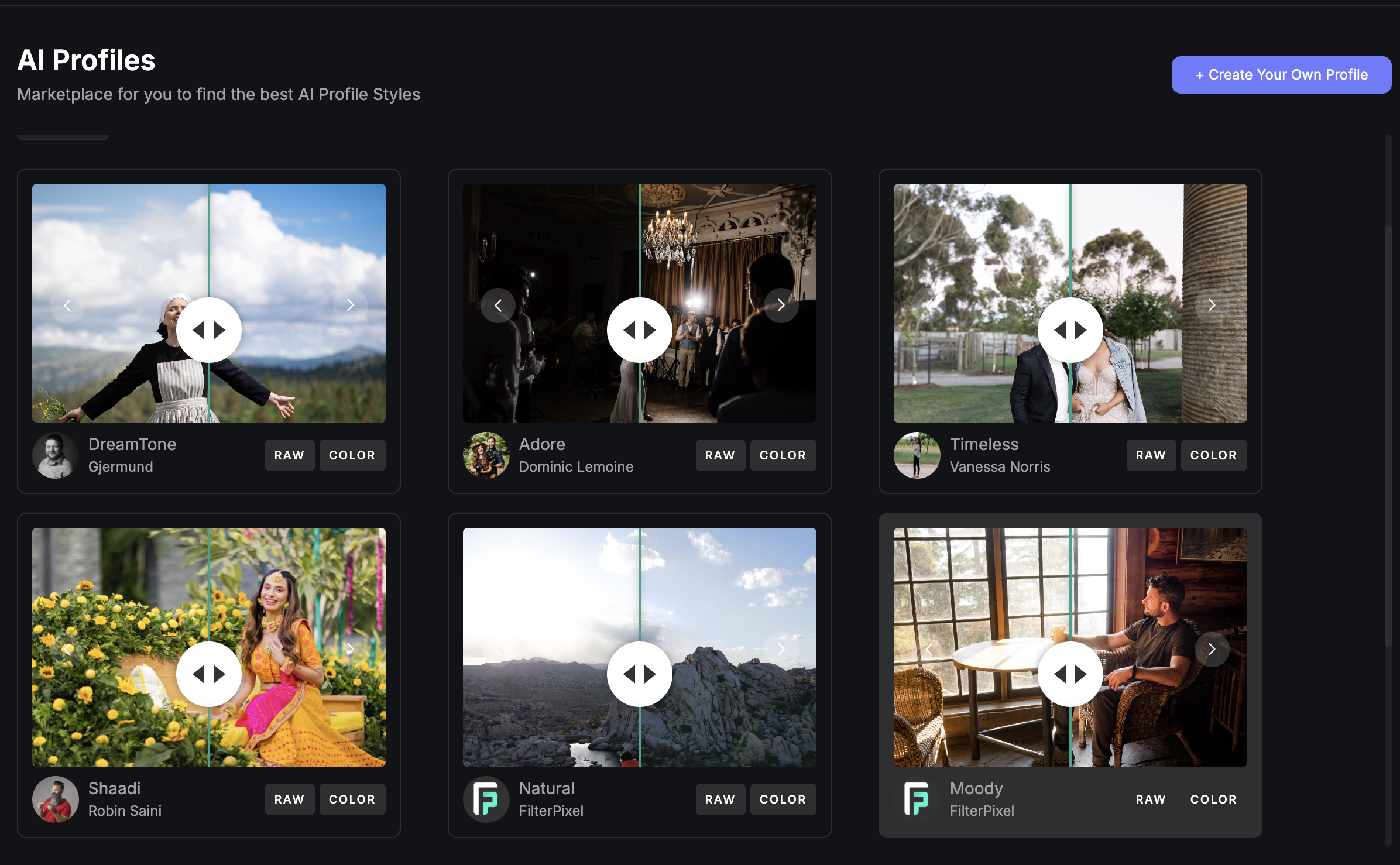
These are AI-powered editing styles, handcrafted by working photographers and fine-tuned across thousands of scenarios. You don't spend hours building a look from scratch. You pick a profile that fits your vibe, and FilterPixel does the heavy lifting.
New: See Before You Export
Here's what changed. You no longer edit blind. With the new Before/After preview, you can see exactly how a profile transforms each image before you export toggle the original against the edited version, confirm the look holds across your gallery, and only then send it out. No more exporting on faith and discovering surprises in Lightroom.
Eight Profiles. Infinite Possibilities.
Here are the eight editing profiles available inside FilterPixel today, with notes on when to reach for each.
Timeless — Clean. Classic. Consistent.
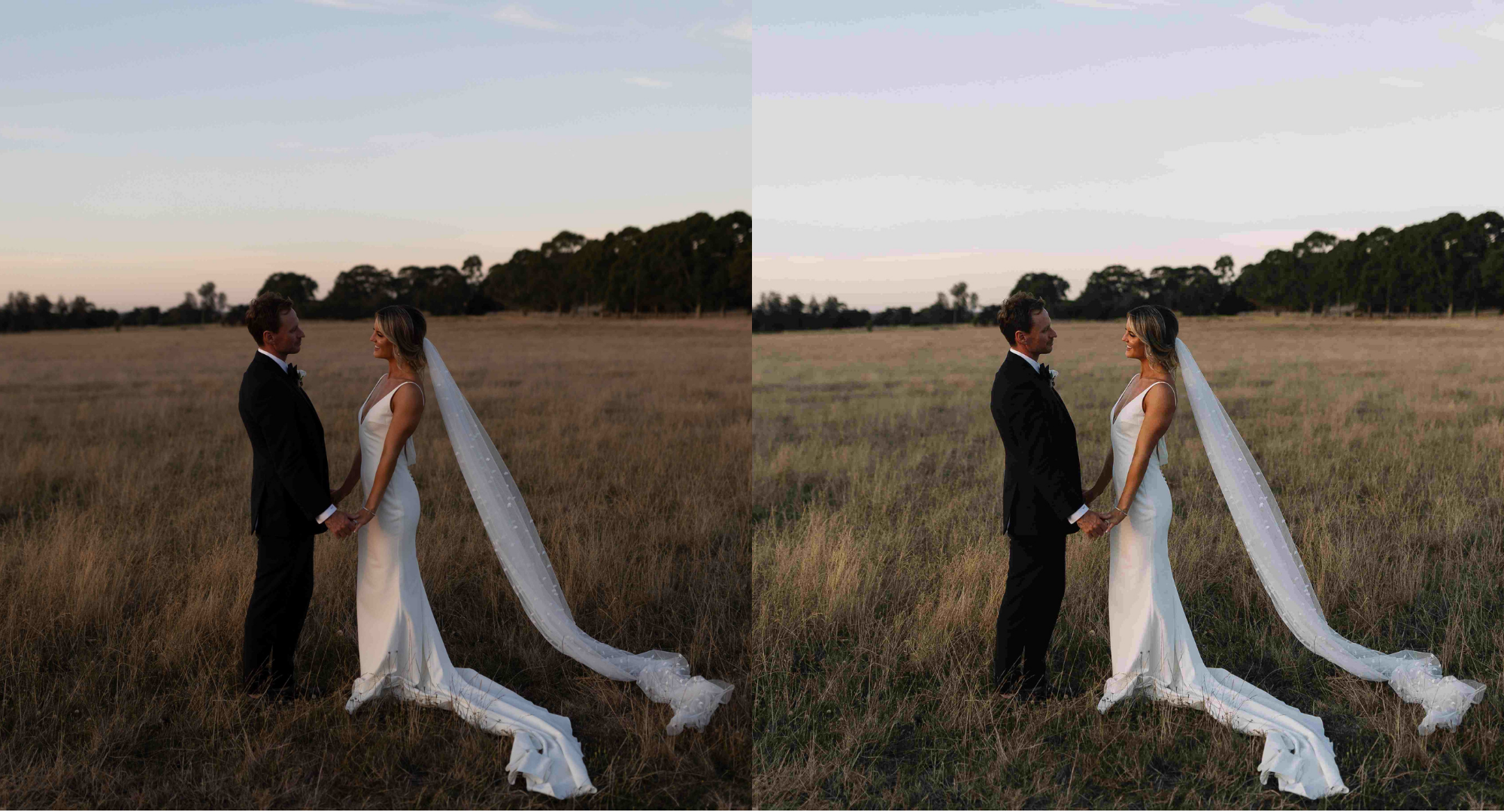
Modern edits. Zero trend-chasing. All the feels. Created by Vanessa Norris.
Vanessa Norris is an Australian wedding photographer known for honest emotion, clean edits, and a timeless aesthetic. Her Timeless profile delivers a professional finish with no distractions just pure, beautiful storytelling.
Timeless is a neutral profile that gives images a professional finish with minimal fuss: crisp, clean, consistent. No wild color shifts, no heavy contrast. Just honest tones, subtle depth, and clean whites with natural skin tones and the right pop of contrast.
What it does: Neutralizes tones without flattening the image, keeping colors true to life while holding a crisp, editorial look. It balances dynamic range with precision so highlights and shadows coexist, enhancing skin tones without washing them out.
Best for:
- Wedding portraits
- Mixed lighting conditions
- Consistent, professional galleries
Adore — Romance With a Glow
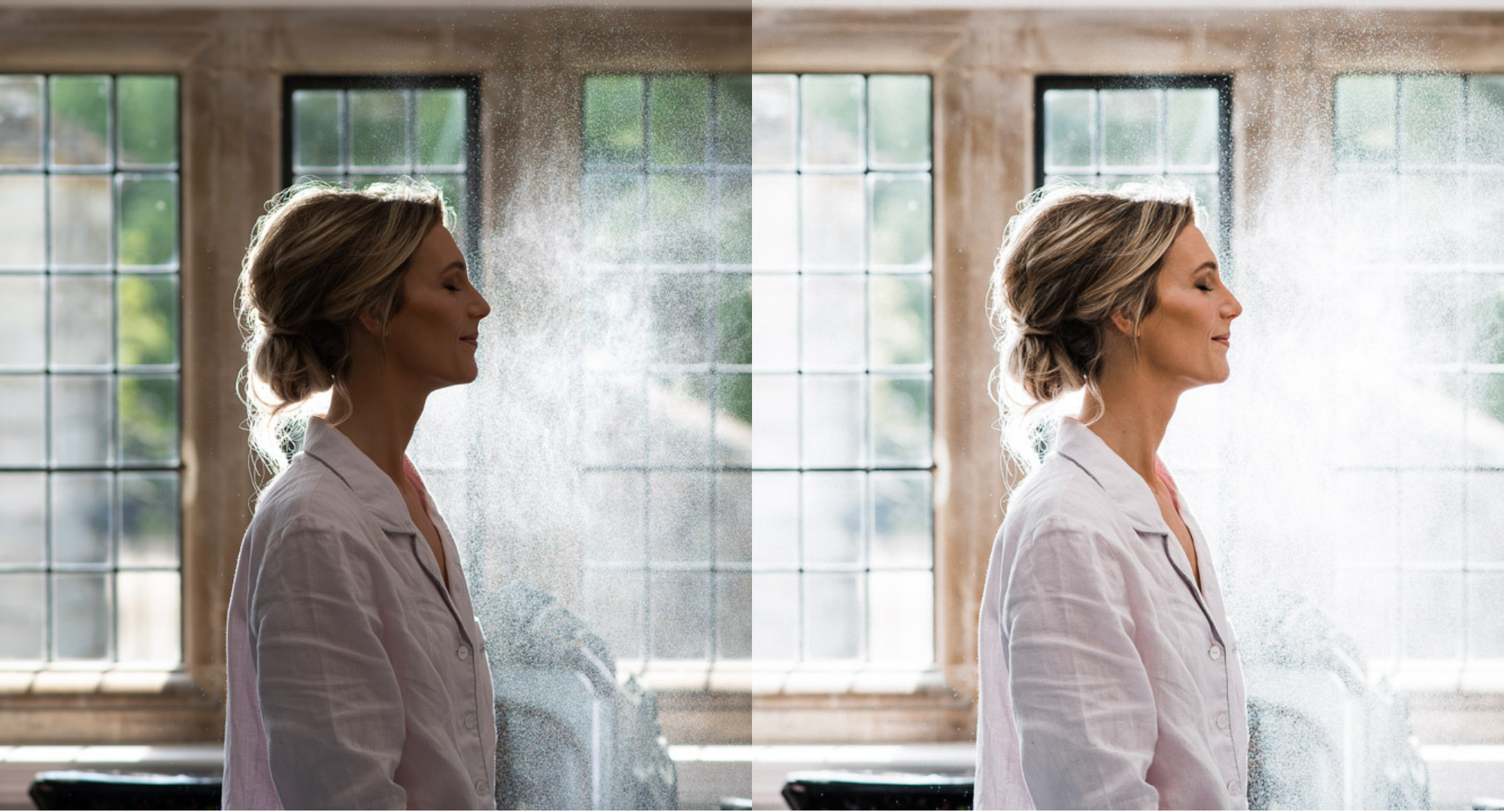
Dreamy light. Soft skin. Editorial feels. Created by Dominic Lemoine.
Dominic Lemoine is a UK-based documentary and wedding photographer known for soft storytelling and emotional depth. His Adore profile reflects warmth, mood, and love in every frame, with a refined editorial touch.
Adore presents images in gentle warmth and a flattering glow ideal for first looks, golden-hour couple portraits, or candle-lit receptions. It brings softness to harsh light, adds warmth where needed, and keeps storytelling consistent across daylight and low-light shots.
What it does: Wraps images in soft, flattering warmth that enhances romantic storytelling. It subtly opens shadows for low-light scenes, softens highlights rather than clipping them, and preserves ambient warmth while holding depth and clarity.
Best for:
- Couple shoots & engagements
- Low-light dance floors
- Golden hour, soft window light, and any romantic, storytelling-focused gallery
Dreamtone — Earthy, Soft, Organic
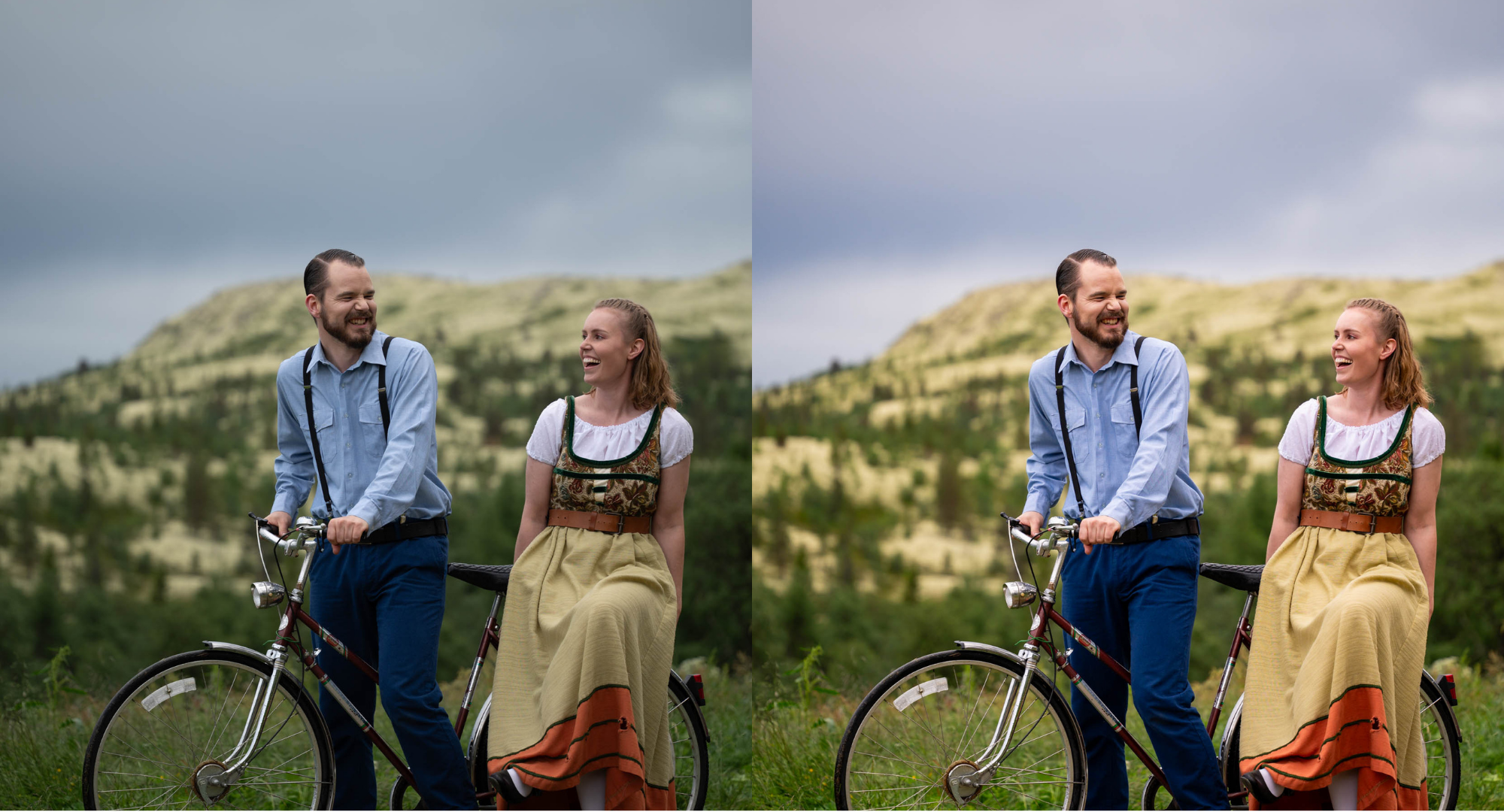
For lovers of clean tones, natural light, and nostalgic storytelling. Created by Gjermund Dammen.
Gjermund Dammen is a portrait and lifestyle photographer from Norway whose style emphasizes natural light and calm, grounded tones. Dreamtone reflects his love of subtle storytelling and painterly edits.
Dreamtone is built for outdoor shoots, rustic weddings, and editorial portraits with a vintage twist. It keeps skin tones real, enhances landscapes, and adds a soft matte finish that feels like a film still.
What it does: Brings out earthy hues and soft cinematic contrast a go-to for natural-light photographers. It enriches skies and grounds tones while keeping gentle transitions between shadows and highlights, leaving skin tones organic and avoiding oversaturation for a painterly, film-like result.
Best for:
- Lifestyle shoots
- Forest or mountain backdrops
- Documentary-style storytelling
Shaadi — Bold. Bright. Beautiful.
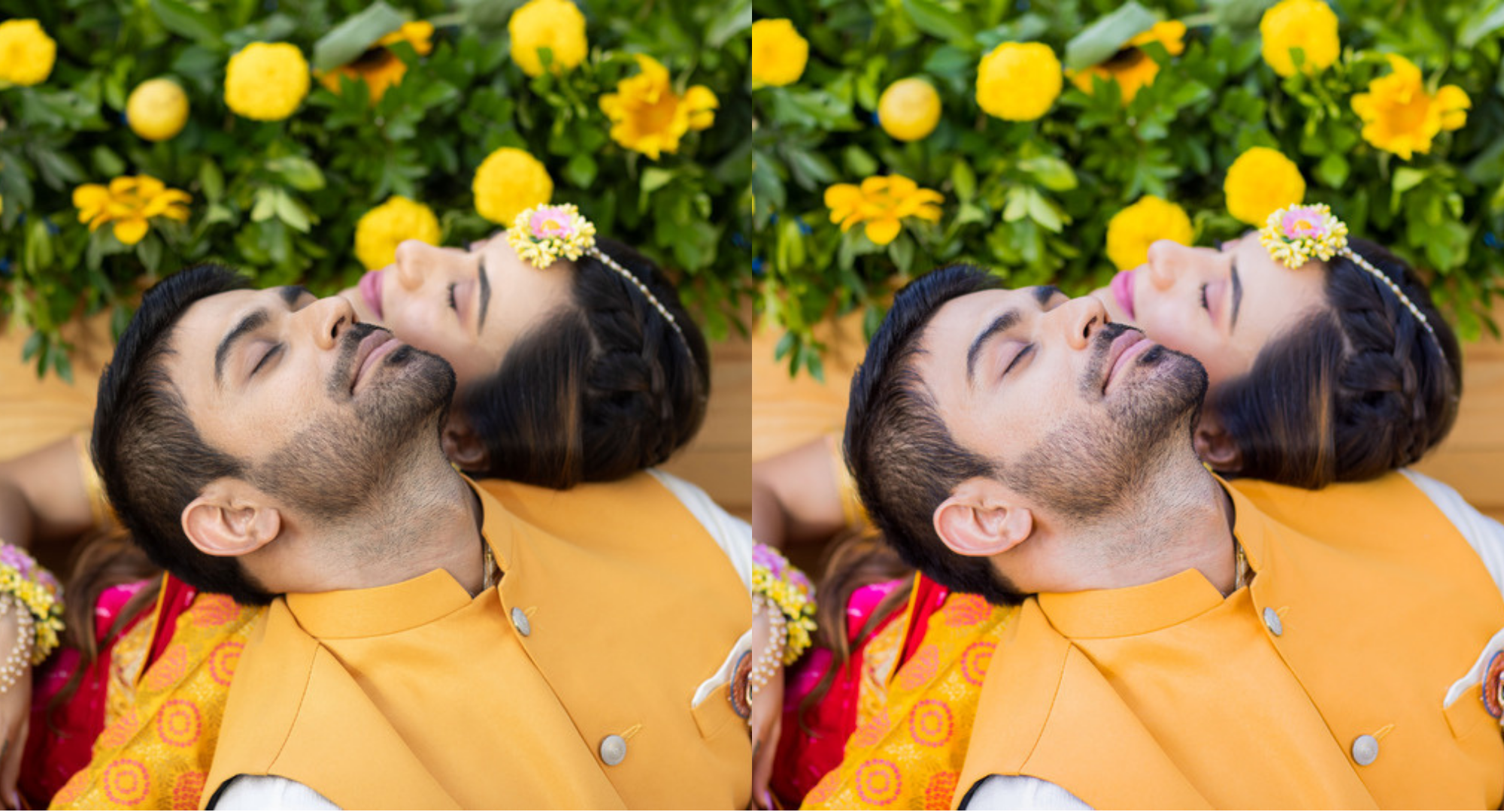
For bold colors, bright energy, and unforgettable moments. Created by Robin Saini.
Robin Saini, a renowned Indian wedding photographer, built the Shaadi profile to capture the vibrancy and emotion of celebration-focused photography. Years shooting high-energy South Asian weddings informed its tone and precision.
Shaadi brings life to festive events from a wedding in Jaipur to a backyard party in California. It enhances rich reds, yellows, and greens without oversaturation and keeps skin tones glowing and clean.
What it does: Lifts vibrancy while holding a controlled, professional finish. It lifts shadows on faces to keep subjects well-lit in dynamic environments, renders cultural attire and décor vivid yet true to life, and smooths skin tones naturally without the plasticky look of aggressive retouching.
Best for:
- Traditional weddings (South Asian, Latin, Jewish - you name it)
- Outdoor ceremonies with colorful outfits or floral décor
- High-contrast midday sun and evening cocktail events
Bright & Airy — Light. Fresh. Effortless.
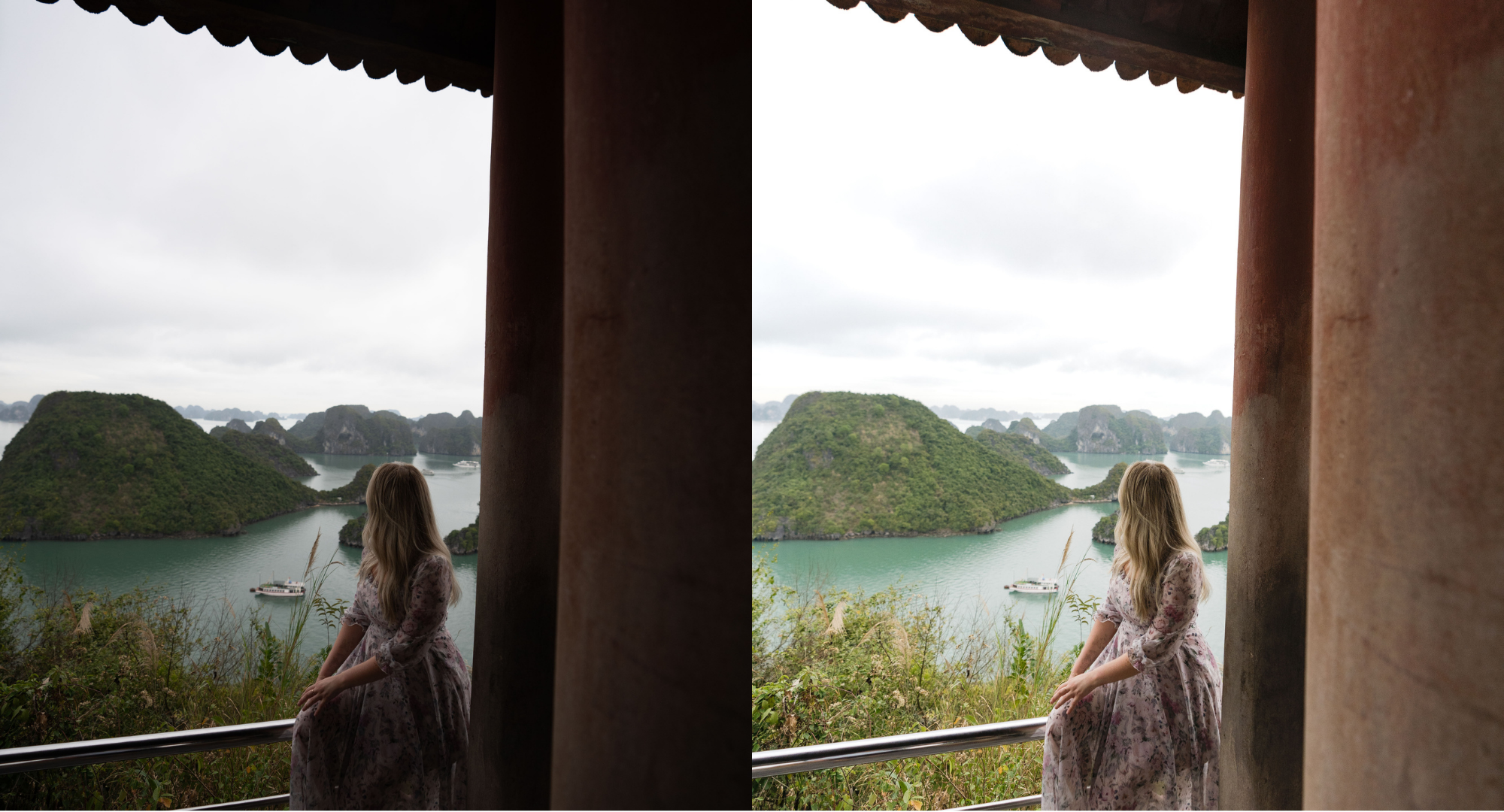
Open shadows. Luminous greens. That clean, breezy finish. Created by the FilterPixel team.
Built in-house by the FilterPixel team, Bright & Airy is for photographers who love a light, fresh, lived-in look, the kind of edit that feels like sunlight pouring into the frame. It opens up dark corners, lifts the whole image, and keeps everything clean and inviting without blowing out the highlights.
Bright & Airy takes scenes that start out shadowy or backlit and turns them luminous. It brightens midtones, gently lifts shadows so detail returns to the darker areas, and keeps whites crisp and clean. Greens and natural tones stay fresh rather than muddy, and skin tones read soft and natural never overexposed.
What it does: Bright & Airy lifts overall exposure and opens shadows to reveal detail hidden in darker areas, transforming dim or backlit frames into clean, luminous images. It brightens midtones while protecting highlights from clipping, so bright skies and white surfaces stay controlled. Greens and ambient tones are refreshed for a crisp, breezy feel, and skin tones remain soft and natural, making it ideal for photographers who want a light, modern, effortless aesthetic across their gallery.
Best for:
- Lifestyle, travel, and destination shoots
- Backlit or shadow-heavy scenes that need lifting
- Bright, clean, modern galleries with a fresh, airy mood
Natural — True to Life. Just Better.
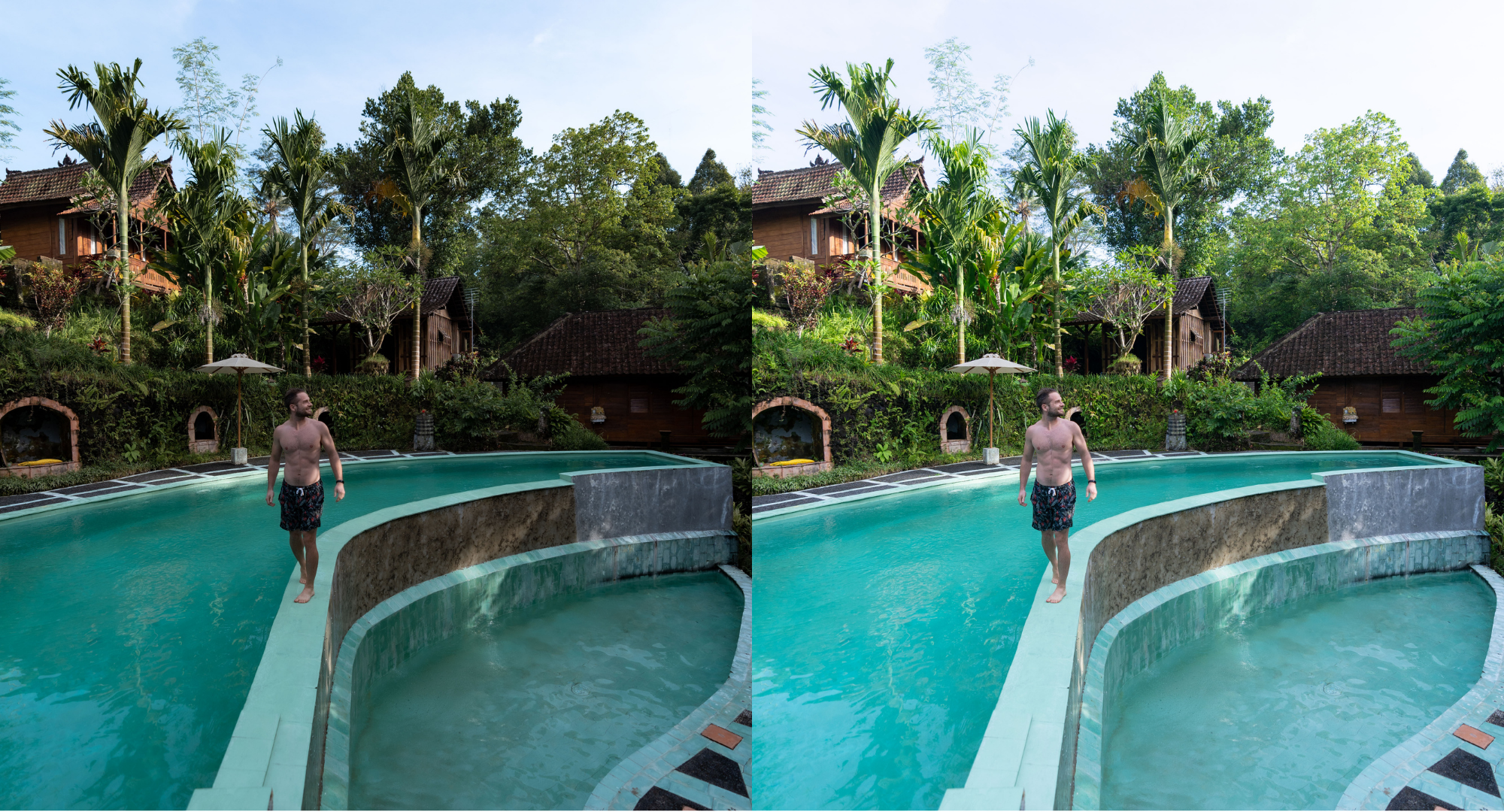
Accurate color. Balanced light. The scene as you saw it. Created by the FilterPixel team.
Built in-house by the FilterPixel team, Natural is for photographers who don't want a "look" they want the moment, faithfully. It's the most restrained profile in the set: no stylized color, no heavy mood, no trend. Just clean, accurate tones and balanced light that keep the image true to how the scene actually felt.
Natural gently corrects without editorializing. It evens out exposure, tames overly punchy contrast, and keeps skies, greens, and skin tones realistic rather than saturated. The result is a polished, believable image that still looks untouched ideal when authenticity matters more than a signature style.
What it does: Natural prioritizes color accuracy and tonal balance over stylization. It softens excessive contrast and saturation for a calmer, true-to-life rendering, keeps skies and foliage realistic rather than oversaturated, and holds skin tones neutral and accurate. Exposure is balanced so highlights and shadows feel even and natural, delivering a clean, professional finish that looks faithful to the original scene perfect for photographers who want correction without a heavy creative hand.
Best for:
- Real estate, travel, and documentary work where accuracy matters
- Galleries that need a clean, neutral baseline edit
- Photographers who prefer minimal, true-to-life color over stylized looks
Moody — Deep. Dramatic. Cinematic.
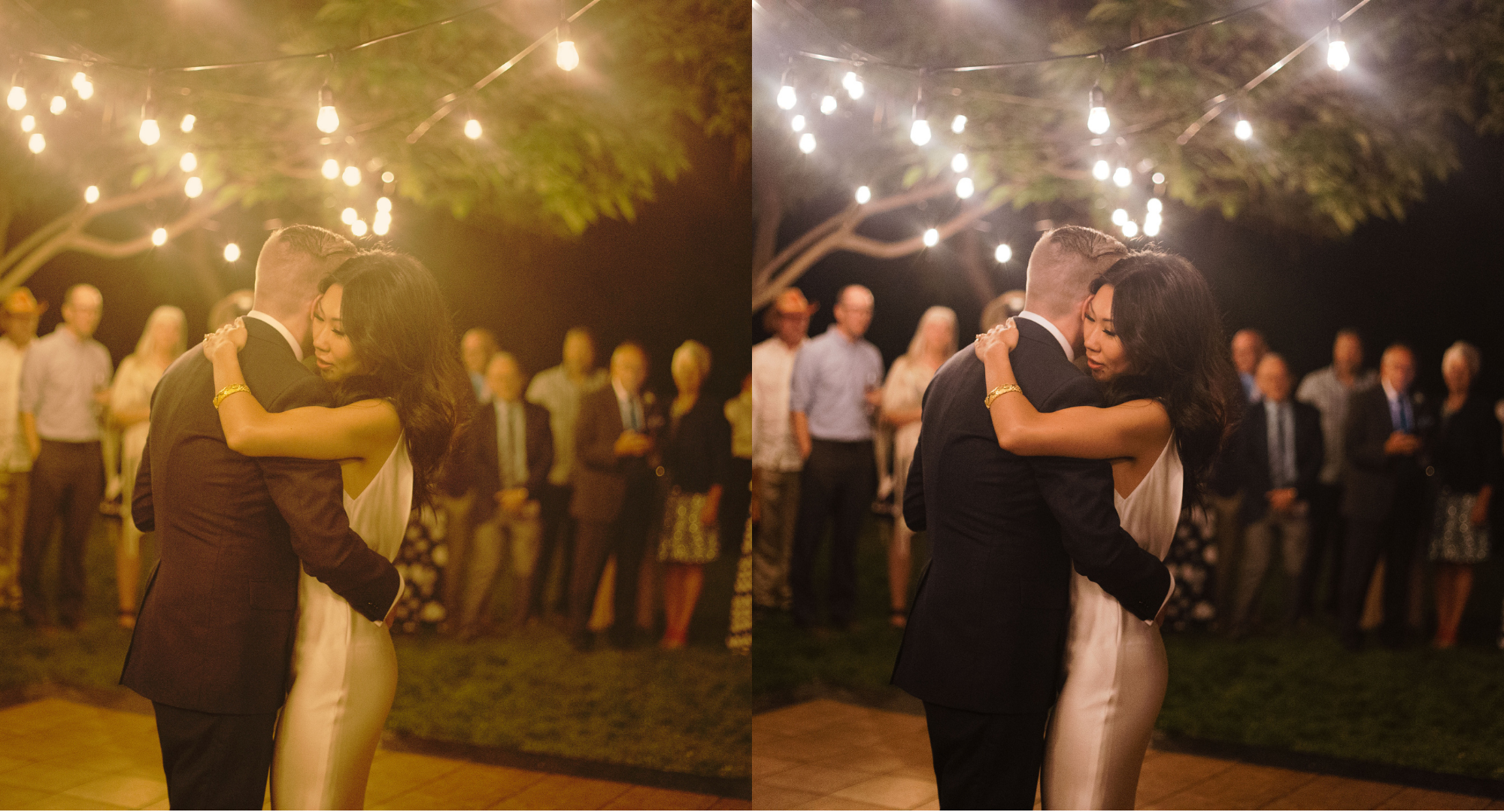
Rich shadows. Controlled warmth. Atmosphere you can feel. Created by the FilterPixel team.
Built in-house by the FilterPixel team, Moody is for photographers who want emotion and atmosphere over brightness. It leans into shadow, deepens the frame, and reins in harsh warmth to create a cinematic, story-driven look the kind of edit that makes a low-light moment feel as charged as it did in person.
Moody adds depth and drama without losing your subject. It deepens shadows and richens blacks for contrast, cools and controls overly warm light so glowing bulbs and ambient sources stay atmospheric rather than blown out, and keeps the focus on the people in the frame. The result is a dramatic, film-like rendering made for evenings, receptions, and emotionally heavy moments.
What it does: Moody enriches shadows and deepens contrast to build a cinematic, atmospheric mood. It tames excessive warmth from artificial and ambient light, keeping highlights like string lights and candles controlled rather than clipped, while preserving detail in the darker areas of the frame. Skin tones stay grounded and natural against the deeper background, and the overall tonality leans dramatic and film-like ideal for low-light scenes where emotion and atmosphere matter more than brightness.
Best for:
- Evening receptions, first dances, and low-light moments
- Dramatic, emotionally driven storytelling
- String-light, candle-lit, and artificial-light scenes that need controlled warmth
Summit — Clear. Corrected. Conference-Ready.
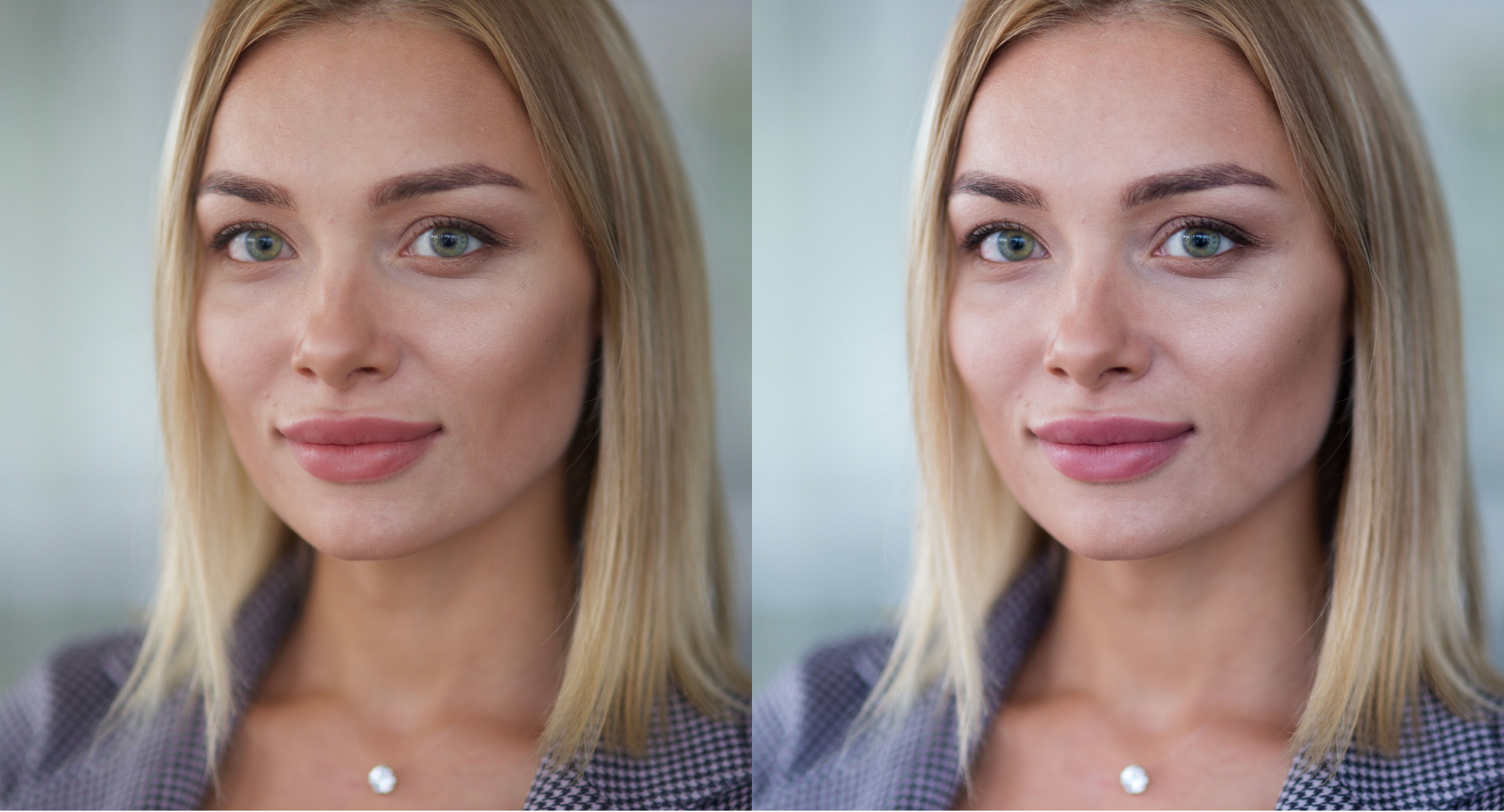
Accurate exposure. True color. Stage light, solved. Created by the FilterPixel team.
Built in-house by the FilterPixel team, Summit is purpose-built for corporate events and conferences the venues where lighting is rarely on your side. Dim stages, mixed color temperatures, harsh spots, and deep shadows are exactly what this profile is designed to clean up, fast, across an entire event gallery.
Summit lifts underexposed frames and corrects color so subjects look sharp, professional, and accurate. It brightens speakers and panelists without washing them out, neutralizes the color casts that stage and screen lighting throw onto skin and clothing, and recovers detail lost in shadowed backgrounds. Brand colors, signage, and wardrobe stay true to life essential for client-facing event deliverables.
What it does: Summit prioritizes accurate exposure and color correction for challenging event lighting. It lifts underexposed subjects and opens shadowed backgrounds to recover detail, balances mixed color temperatures from stage lights and screens so skin tones and brand colors read true, and keeps whites clean and neutral. Contrast stays controlled for a polished, professional finish that holds consistent across a fast-moving event making it ideal for photographers delivering large corporate and conference galleries under deadline.
Best for:
- Corporate events, conferences, and panel sessions
- Dim or mixed-lighting stages where exposure and color need correcting
- High-volume event galleries that need a consistent, client-ready finish
Can I Customize the Profiles?
Absolutely. You can train your own Custom AI Editing Profile. Upload a Lightroom catalog with 3,000+ edited images, and FilterPixel learns exactly how you edit from skin tones to shadows to exposure. Your signature style, finally on autopilot.
Custom AI Profile training is available on FilterPixel's paid plans it's the upgrade serious photographers reach for once they want the AI editing in their style, not just a preset.
FilterPixel vs Imagen AI: Which Fits the Way You Work?
If you're shopping for the best AI photo editing software in 2026, Imagen AI will come up and it's a genuinely capable editing tool. So here's an honest comparison to help you choose, not a takedown. The core difference is what each tool is built around. Imagen AI is an editing engine: you train it on your past galleries, and it edits in your style. FilterPixel is a complete workflow, it culls your thousands of frames down to the keepers first, then applies a consistent edit across the gallery. One answers "edit these for me." The other answers "which of these 5,000 frames are even worth editing and then edit them." That difference shows up most in two places photographers actually feel: cost and culling.
The pricing models are fundamentally different
Imagen AI charges per photo. Pricing starts at $0.05/photo on pay-as-you-go (with a $7/month minimum), and its annual tiers run from 18,000 to 72,000 photos a year, the popular 36K tier costs $127.50/month. Each additional AI tool (crop, straighten, subject mask, and so on) adds $0.01/photo on top, which can push the effective rate to roughly $0.073/photo if you use all of them.
FilterPixel uses flat, predictable pricing instead. A busy month costs the same as a slow one — no per-photo meter, no overage anxiety during peak season.
Here's what that means in practice for a wedding photographer shooting 30 weddings a year at 2,000 photos each (60,000 photos):
| FilterPixel | Imagen AI | |
|---|---|---|
| Pricing model | Flat subscription | $0.05/photo + add-ons |
| Cost at 60,000 photos/yr | ~$228/yr | ~$2,388/yr |
| Per-photo add-on tools | Included | +$0.01/photo each |
| Annual lock-in | Flexible | 12-month commitment on volume tiers |
| Free to start | 4 full projects, no credit card | 1,000 free edits |
For high-volume, deadline-driven shooters, that gap is the whole story: the more you shoot, the more the per-photo model costs you.
Culling is FilterPixel's core, not an add-on
This is the part that matters most for the workflow we've been describing. Imagen AI added culling as a secondary feature; FilterPixel's DeepCull was purpose-built for it, analyzing composition, sharpness, expressions, and technical quality together with no profile training required. It works accurately from your very first project, while style-trained editing tools need several edited galleries uploaded before they're useful.
Shot thousands of photos? FilterPixel culls them in minutes with genre-specific AI, then applies a consistent edit across the whole gallery. Try DeepCull free →
-Jun-15-2026-11-39-14-2486-AM.png?width=1920&height=960&name=BLOG%20DRAFTS%20(4)-Jun-15-2026-11-39-14-2486-AM.png)
The Complete Post-Shoot Workflow, in One Place
Editing Profiles are only half the story. The real time savings come from running your whole post-shoot in a single workflow.
It starts with the cull. Import thousands of images and let DeepCull FilterPixel's genre-specific AI culling engine sort them in minutes, scoring each photo and surfacing your keepers while flagging the blinks, the soft focus, and the duplicates. What used to eat your first evening back from a shoot now happens before your coffee's cold.
Then you edit. With your selects ready, apply an Editing Profile across the entire gallery, preview the before/after, and fine-tune to taste. Cull to consistent edit in one flow no juggling tools, no exporting between apps just to get started.
That's the whole promise: the deadline-busting workflow for high-volume photographers. Cull, edit, export done before you'd normally have finished selecting.
Try Them Now
Every FilterPixel plan includes access to all editing profiles yes, even on the free trial. Pick a profile, preview the before/after, and export with confidence.
Start free to see how fast cull-to-edit can be. Then, when you're ready to make the AI edit in your own signature style and cull at the volume your deadlines demand a paid plan unlocks Custom AI Profile training and the full high-volume workflow. See pricing plans at: https://accounts.filterpixel.com/pricing