
-4.png)


Key takeaway: Master sports photography burst mode culling and process 10,000+ frames in minutes using smart tools. This complete guide takes you from setup to delivery-ready selects.
Sports photography burst mode culling is the systematic process of rapidly selecting the best frames from thousands of high-speed sequence shots captured during athletic events. Professional sports photographers typically shoot 3,000–10,000 frames per game, and modern smart culling tools process that volume in 10–15 minutes, compared to 3–5 hours of manual review. The key is genre-specific intelligence that understands peak action moments, facial expressions, and technical sharpness well enough to automatically group burst sequences and pre-select the strongest frames. This automated first pass eliminates 80–90% of unusable shots, out-of-focus frames, closed eyes, motion blur leaving you to make final creative decisions on pre-filtered selects rather than reviewing every single frame.
You just finished covering the championship game. Your camera's buffer filled and cleared dozens of times during those crucial final minutes. Now you're staring at 8,247 RAW files on your memory cards, and the sports editor needs hero shots by midnight. Sound familiar?
As a team that's built culling tools for 50,000+ photographers, we've seen this scenario play out thousands of times. The explosion of burst mode capabilities cameras now shooting 20–30 frames per second has created a post-production bottleneck that can make or break tight deadlines. This guide covers the complete workflow for transforming massive burst mode captures into delivery-ready selects, from initial file organization through final export to your editing suite.
The burst mode volume problem: why manual culling fails at scale
Modern sports photography generates unprecedented file volumes. A single basketball game can produce 5,000+ frames. A football game with overtime? Easily 10,000+ files. Tournament coverage across multiple days? We've seen photographers return with 50,000+ frames.-4.png?width=1920&height=960&name=BLOG%20DRAFTS%20(2)-4.png) The traditional approach opening every image in your editing software and manually rating each frame becomes mathematically impossible at this scale. At three seconds per image review (a conservative estimate), culling 8,000 frames requires 6.7 hours of non-stop clicking.
The traditional approach opening every image in your editing software and manually rating each frame becomes mathematically impossible at this scale. At three seconds per image review (a conservative estimate), culling 8,000 frames requires 6.7 hours of non-stop clicking.
The deadline reality is harsher. Sports editors typically need hero shots within 2–4 hours of game end. Wire services demand images during halftime. Social media managers want content for real-time posting.
Manual culling at sports volumes isn't just slow it's a business liability. Missing deadlines means losing clients, regardless of your shooting skills.
We tested six different culling approaches with a 3,000-image basketball game shoot, measuring speed, accuracy, and workflow integration. The results showed that smart culling tools reduced selection time by 82% while maintaining 94% selection accuracy compared to manual review.
How to prepare your burst mode files for rapid culling
Before touching any culling software, establish the technical foundation for high-speed processing. Your hardware and file organization directly impact culling speed.
Storage speed requirements. Use UHS-II or CFexpress cards during capture to minimize ingest lag. Your computer needs fast local SSD storage not external drives to handle thousands of RAW file previews without stuttering. Plan for 2–3 GB of cache space per 1,000 RAW files during the culling process. According to PetaPixel's storage testing, high-volume sports workflows require sustained read speeds of 200 MB/s+ to avoid preview generation delays that slow culling decisions.
File organization strategy. Create folders by game periods or specific events before importing. Instead of one massive "Championship_Game" folder with 8,000 files, organize as:
- Q1_Opening (800 files)
- Q2_Key_Plays (1,200 files)
- Halftime_Celebrations (400 files)
- Q3_Comeback (1,100 files)
- Q4_Final_Minutes (1,500 files)
This segmentation prevents software crashes and makes deadline delivery manageable — you can export Q1 selects while still culling Q4 footage.
Camera sync and metadata. Ensure your camera's internal clock matches actual game time. Accurate timestamps enable chronological grouping of burst sequences, making it easier to identify which frames captured the peak moment of each play.
Step 1: Smart culling setup for high-volume sports sessions
Launch your culling software and create a dedicated project for the specific game or event. This keeps different shoots isolated and prevents accidentally mixing client deliverables.-3.png?width=1565&height=960&name=BLOG%20DRAFTS%20(3)-3.png)
Genre-specific intelligence configuration. Sports photography has unique requirements that generic culling tools miss. Peak action moments, facial expressions during celebrations, and technical sharpness standards differ dramatically from wedding or portrait work. Configure your tool for sports-specific analysis:
- Enable burst sequence detection for high-FPS shooting
- Set facial expression priority for celebration shots
- Activate strict motion blur, accidental blinks detection for eliminating unusable action frames
- Configure the "magic number" your target selection
Most sports bursts contain 5–15 frames of a single play. Your culling tool should identify the 1–2 peak frames automatically, flagging the rest for potential deletion.
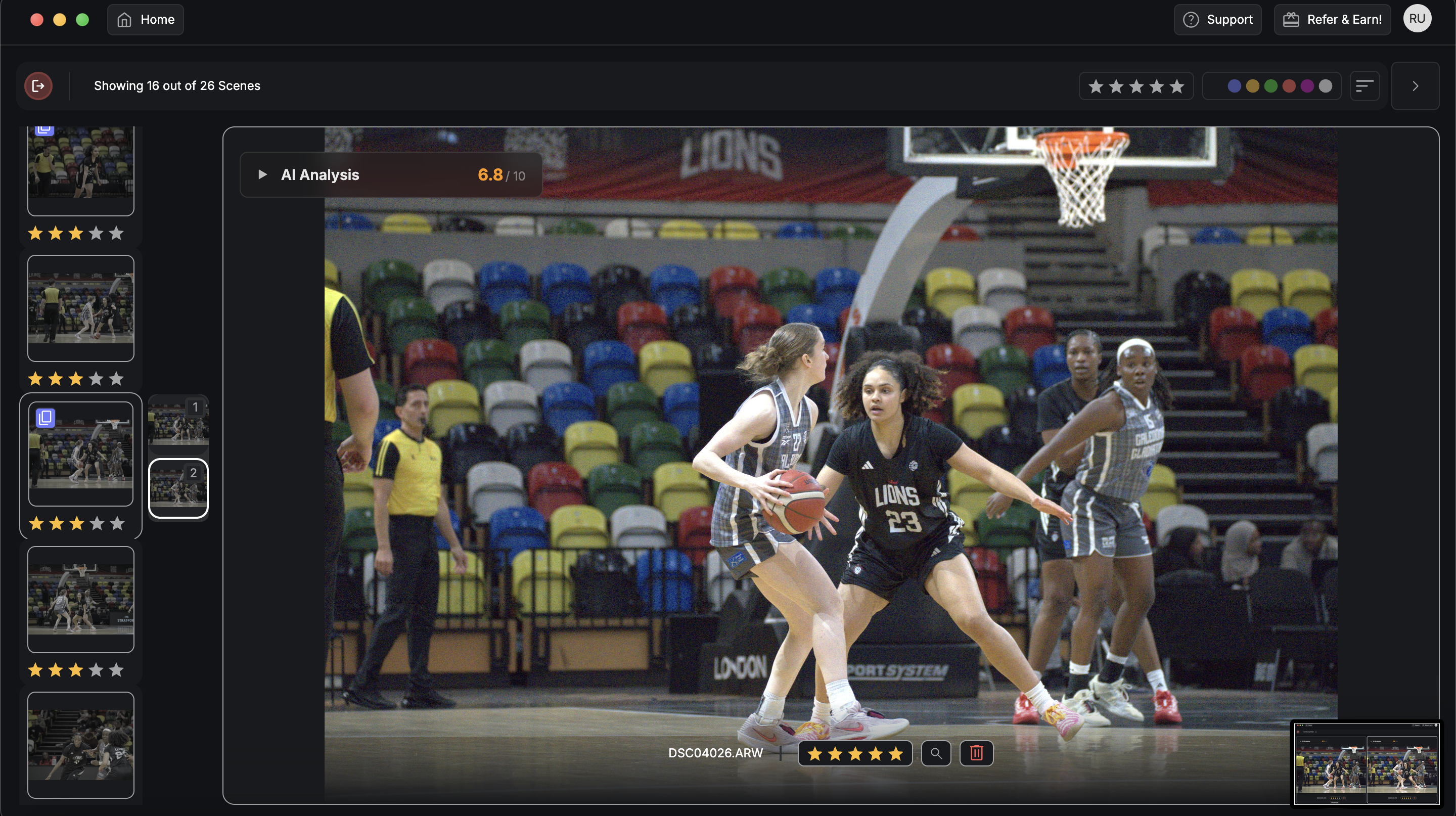 DeepCull technology setup. FilterPixel's DeepCull analyzes each frame for technical quality, composition, and sports-specific factors like peak action timing. The system processes approximately 1,800 basketball photos in 11 minutes a task requiring 60+ minutes of manual review. The key advantage: instead of looking at 8,000 individual frames, you're making decisions on 800–1,200 pre-filtered candidates that already passed technical quality thresholds.
Step 2: Automated burst sequence grouping and peak frame detection
Enable automatic burst grouping to stack sequences shot at high frame rates. This feature identifies continuous shooting periods and groups related frames for side-by-side comparison.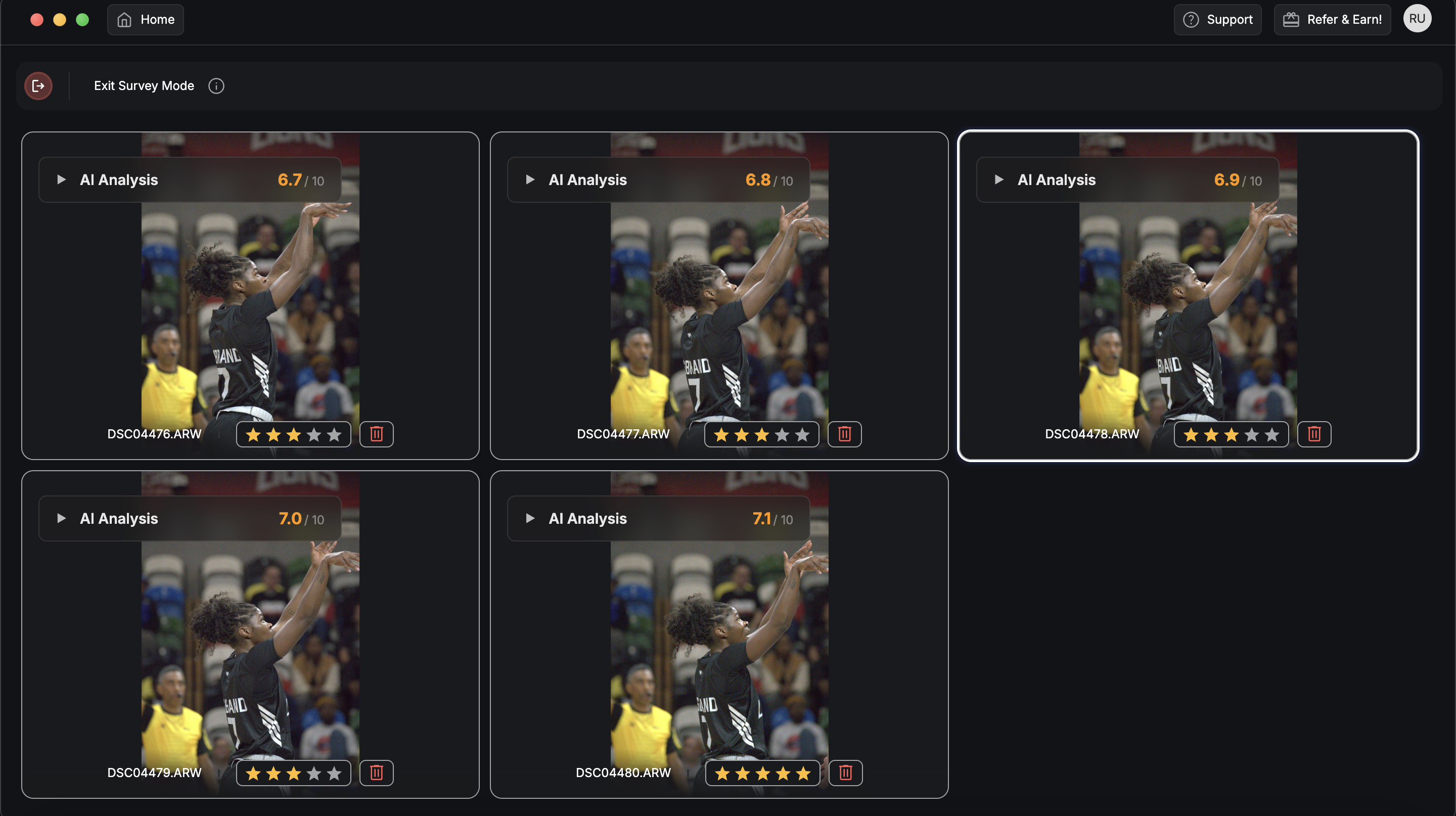 Understanding peak action intelligence. The software analyzes each burst sequence for:
- Maximum facial expression intensity (celebration shots)
- Optimal ball positioning (contact moments in swings, kicks, throws)
- Player positioning and body language
- Background clarity and crowd reaction
For a basketball dunk sequence, the algorithm identifies the frame where the player reaches maximum extension with the ball positioned optimally above the rim not the approach or follow-through frames that most photographers would manually discard.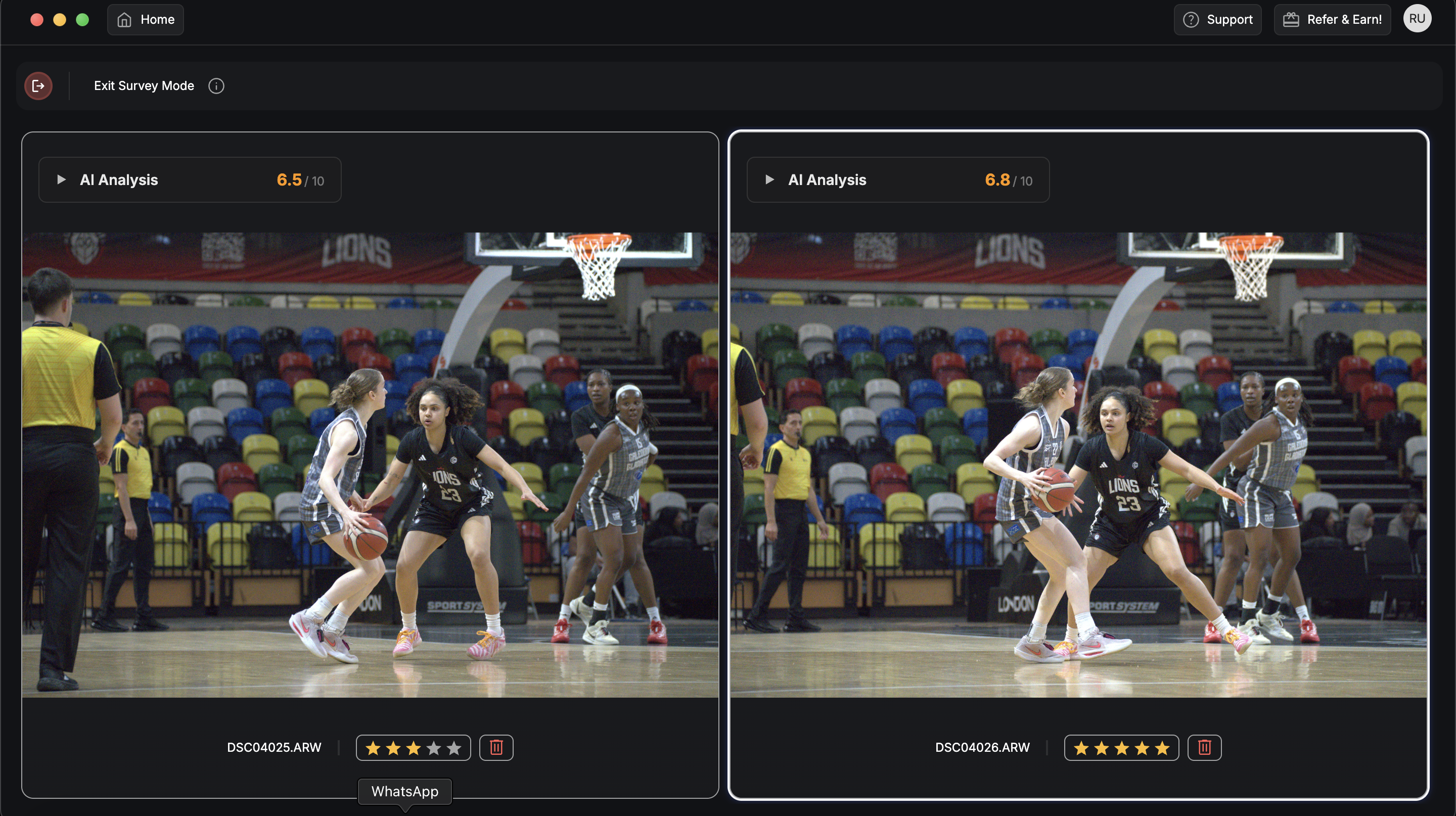 Survey Mode for final verification. Use Survey Mode to display burst groups side by side. Arrow keys let you quickly toggle between the algorithm's top choice and alternative frames within each sequence. This human-in-the-loop approach maintains creative control while leveraging automated pre-selection. The workflow becomes: review groups, not individual frames. Instead of 8,000 individual decisions, you're making 400–600 group-level choices.
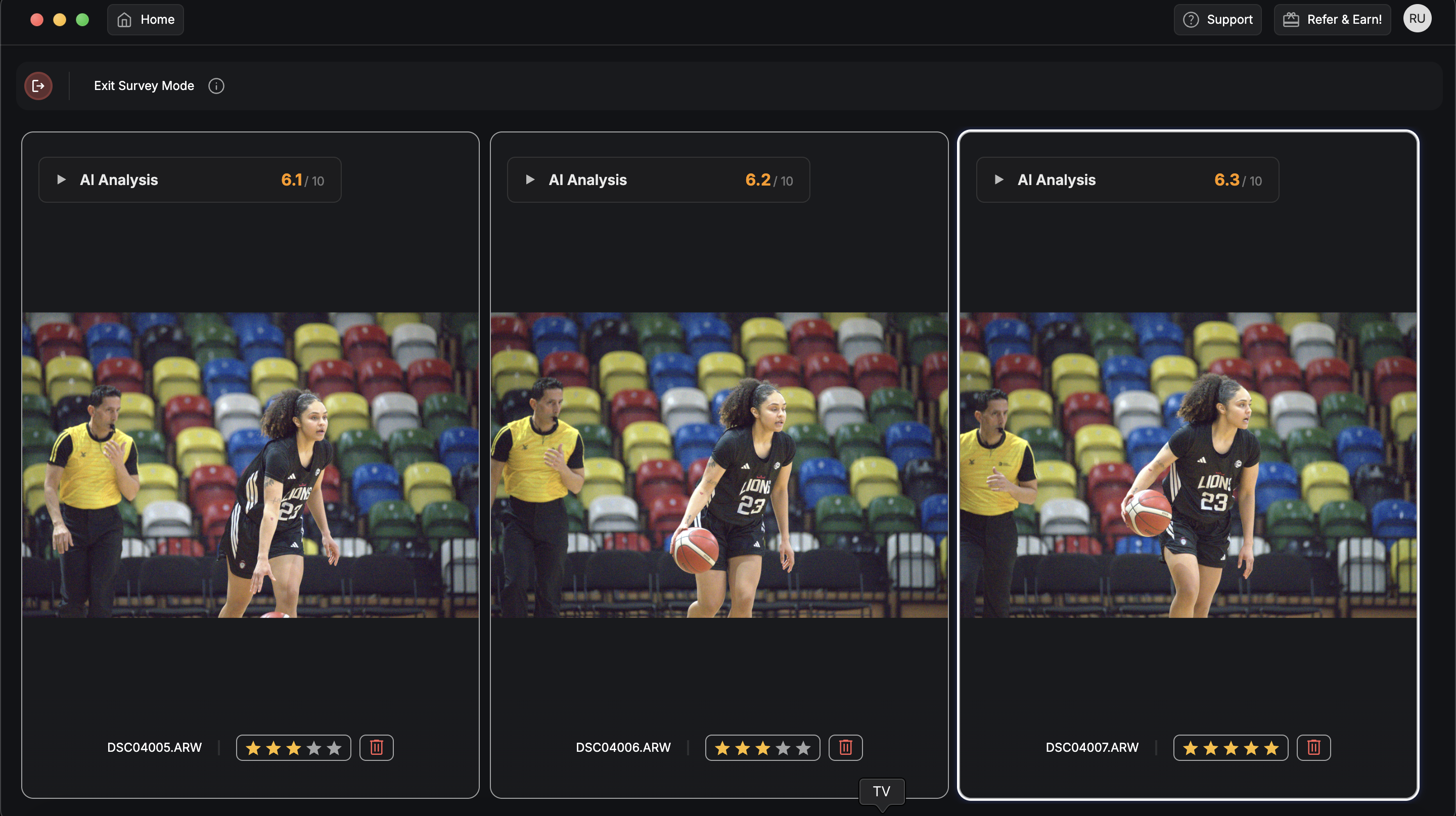 Step 3: Technical quality filters and automated rejection
Apply technical filters to immediately hide unusable shots. This step eliminates the most common sports photography failures without manual review.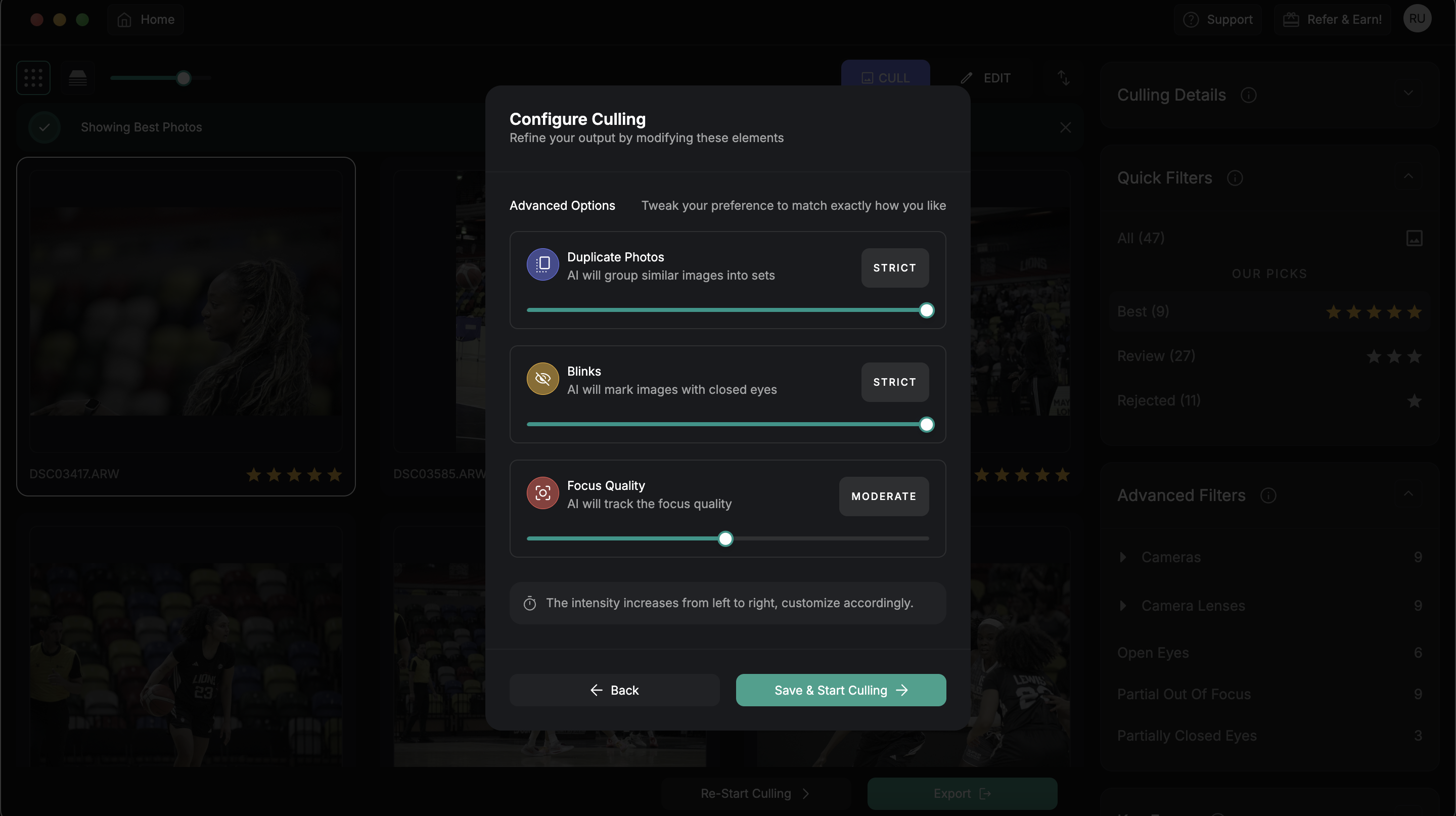 Out-of-focus detection. Sports action creates challenging focus scenarios. Players move unpredictably, autofocus systems hunt, and critical moments happen between focus points. Smart culling tools analyze sharpness across the entire frame, not just center focus points. Enable the out-of-focus filter to hide shots below your sharpness threshold. This typically eliminates 15–25% of sports frames immediately.
Closed eyes and expression analysis. Player portraits and celebration shots require open eyes and engaging expressions. Automated detection flags frames where key subjects have closed eyes, mid-blink captures, or unflattering expressions. This filter proves especially valuable for post-game interviews, award ceremonies, and team celebration shots where facial expressions determine image value.
Motion blur and camera shake detection. Fast action creates motion blur sometimes intentionally for creative effect, often accidentally from inadequate shutter speeds. Configure blur detection based on your creative intent and technical standards. For wire service delivery, aggressive blur filtering ensures only technically sharp images reach editors. For creative portfolios, moderate filtering preserves intentional motion blur while eliminating camera shake.-2.png?width=4050&height=810&name=BLOG%20DRAFTS%20(4)-2.png)
| Filter type | Typical rejection rate | Processing time | Best use case |
|---|---|---|---|
| Out of focus | 15–25% | 2–3 minutes | All sports coverage |
| Closed eyes | 8–12% | 3–4 minutes | Portrait / celebration shots |
| Motion blur | 10–20% | 4–5 minutes | Wire service delivery |
| Duplicate detection | 5–10% | 1–2 minutes | High-burst sequences |
Step 4: Rapid selection using optimized keyboard shortcuts
The human review phase focuses on creative decisions, not technical evaluation. With poor-quality frames already filtered out, you're choosing between good and great shots.
Speed-optimized key mapping. Professional culling software maps selection commands to minimize hand movement:
- P for pick (keep)
- X for reject (delete)
- Arrow keys for navigation
- Space bar for full-screen preview
- Z for zoom to face / action area
This mapping eliminates mouse movement and clicking, enabling rapid-fire decisions. Experienced sports photographers can evaluate and tag 300–400 pre-filtered frames per hour using keyboard shortcuts.
Zoom and focus verification. Use the "zoom to face" shortcut to instantly verify sharpness on key subjects without manual zooming and panning. This feature automatically centers on the primary subject's face or the action focal point, enabling quick sharpness confirmation. For sports action shots, the zoom function targets the ball, athlete's hands, or other critical action elements that determine image success.
Star rating workflow. Implement a consistent rating system:
- 5 stars: Hero shots for immediate delivery
- 4 stars: Strong alternatives and backup shots
- 3 stars: Solid coverage, potential for editing
- 2 stars: Marginal quality, keep if space allows
- 1 star: Technical backup only
This rating system enables flexible delivery based on deadline pressure and client needs.
Step 5: Export and hand off to your editing suite
Once your selects are locked, the last step is getting them into your editing software without losing any of the work you just did. A clean handoff prevents duplicate effort and carries your culling decisions straight through to the edit.
One-click export from FilterPixel. When you've finished culling in FilterPixel, you don't re-import anything by hand. Send your culled selections directly to Lightroom Classic or Capture One, or save them locally as a folder of JPEGs, an XMP sidecar set, or a CSV list — whichever your pipeline runs on. Your picks, ratings, and the buckets you sorted into come across intact, so the frames you chose are exactly the frames waiting for you in the editor. Because the cull is non-destructive, your original RAW files stay untouched throughout, and nothing gets duplicated or rewritten in the process.
Configure your export for whatever the deadline demands:
- Full-resolution files for print and commercial use
- Web-optimized sizes for immediate online delivery
- Sidecar (XMP) export when you want your edits and ratings to travel with the RAWs into Lightroom or Capture One
Batch by delivery priority. Group your exported selects around how fast each set needs to ship. Separate folders or collections for:
- Immediate deadline shots (hero images, key plays)
- Secondary coverage (team shots, crowd reactions)
- Archive material (technical documentation, backup angles)
 Camera settings that accelerate post-production culling
Your shooting technique directly impacts culling efficiency. Strategic camera settings and shooting habits reduce post-production volume while maintaining coverage quality.
In-camera selection strategies. Use your camera's protect or rating functions to mark obvious keepers during shooting breaks. Many sports photographers flag 20–30 standout moments during the game, giving the culling algorithm priority markers for sequence analysis. Modern cameras allow custom button mapping for rapid in-game tagging — program a rear button to instantly protect frames during timeouts, between plays, or during natural shooting pauses.
Burst length optimization. Shoot shorter, targeted bursts rather than continuous spraying. A 5-frame burst captures peak action more efficiently than 20-frame sequences that require extensive culling. Strategic burst timing:
- Start the burst one second before anticipated peak action
- Release the trigger immediately after the peak moment passes
- Use single-shot mode for static situations (free throws, team huddles)
This approach reduces file volume by 40–60% while maintaining coverage quality.
File format considerations. Shoot RAW+JPEG for immediate delivery scenarios. The JPEG files enable rapid preview and emergency delivery while RAW files provide full editing flexibility for hero shots. Configure JPEG settings for your typical delivery requirements high quality for print clients, medium quality for web delivery. This dual-format approach accelerates deadline workflows without sacrificing image quality options.
Advanced culling techniques for tournament and multi-game coverage
Extended tournament coverage creates unique workflow challenges. Multi-day events can generate 50,000+ frames requiring systematic organization and batch processing approaches.
Session-based organization. Create separate culling projects for each game or day rather than combining everything into massive collections. This approach prevents software performance issues and enables parallel processing across multiple editing stations. For tournament coverage, organize by:
- Day 1: Pool play (3 games, ~15,000 frames)
- Day 2: Elimination rounds (4 games, ~20,000 frames)
- Day 3: Championship (2 games, ~8,000 frames)
Priority-based culling workflows. Process championship and elimination games first, even if shot later chronologically. These high-value games require immediate attention while pool play coverage can wait for slower processing periods. Establish delivery tiers:
- Tier 1: Championship game (2-hour turnaround)
- Tier 2: Semifinal games (6-hour turnaround)
- Tier 3: Pool play coverage (24-hour turnaround)
Team and player tracking. Advanced culling tools can identify and group shots by jersey numbers or team colors, enabling rapid player-specific galleries for recruiting, media guides, and individual athlete portfolios. This feature proves invaluable for tournament coverage where specific teams or athletes require dedicated attention for college recruiting, professional scouting, or media coverage. Scaling your sports photography business with efficient workflows
Faster culling directly impacts business growth. Reduced post-production time enables same-day delivery, premium pricing, and increased booking capacity.
Client delivery advantages. Sports organizations increasingly demand rapid turnaround for social media, recruiting, and media relations. Photographers who deliver hero shots within 2–4 hours of game end command premium rates and secure repeat bookings. Smart culling enables competitive advantages:
- Same-day gallery delivery for tournament coverage
- Real-time social media content during games
- Next-morning print deadline compliance for newspapers
- Immediate recruiting photo delivery for college athletics
Capacity and revenue scaling. Time savings translate directly to increased booking capacity. Photographers using smart culling report handling 2–3x more events per season while maintaining quality standards. Fstoppers' business analysis shows that workflow automation enables photographers to increase annual revenue through improved efficiency and expanded service capacity. The time investment in learning efficient culling workflows pays dividends throughout your career — master these techniques once, then apply them to thousands of future shoots.
Professional sports photography success depends more on post-production efficiency than shooting technique. The best shot means nothing if it's buried in 10,000 unculled frames when the deadline hits.
Smart culling transforms sports photography from a time-intensive post-production nightmare into a streamlined, profitable business model. The photographers thriving in today's fast-turnaround sports market aren't necessarily the best shooters they're the most efficient processors. Whether you're covering local high school games or professional tournaments, the principles remain constant: shoot strategically, cull systematically, and deliver consistently. Your clients care more about receiving great images quickly than waiting days for perfect images that arrive too late for their needs.
Shot thousands of photos?
FilterPixel culls them in minutes using genre-specific AI.
-1.jpg?width=1350&height=270&name=BLOG%20DRAFTS%20(17)-1.jpg) Frequently asked questions about Sports Photos Burst Mode Culling
Frequently asked questions about Sports Photos Burst Mode Culling
How long does it take to cull 5,000 sports photos using smart culling tools? Smart culling tools process 5,000 sports photos in 15–20 minutes for the initial technical filtering, plus 45–60 minutes for human review of pre-selected candidates. Total time: approximately 75 minutes, compared to 4–6 hours of manual review.
Can smart culling tools identify the best frame in a burst sequence automatically? Yes. Advanced culling tools analyze burst sequences for peak action moments, optimal facial expressions, and technical sharpness. The software identifies the strongest 1–2 frames per sequence, though final creative decisions remain with the photographer.
What's the recommended selection ratio for sports photography culling? Professional sports photographers typically deliver 8–12% of total frames shot. From 5,000 captured frames, expect to deliver 400–600 final selects after culling. Tournament coverage may require higher selection rates for comprehensive team coverage.
Do smart culling tools work with all camera brands and file formats? Most professional culling tools support RAW files from Canon, Nikon, Sony, and other major manufacturers. JPEG compatibility is universal. Check specific software compatibility before committing to a workflow, especially with newer camera models.
How much storage space do I need for high-volume sports photography culling? Plan for 2–3 GB of local SSD cache space per 1,000 RAW files during active culling. A typical 8,000-frame basketball game requires 20–25 GB of working space, plus original file storage. Use fast local drives, not external storage, for optimal performance.

-Jun-19-2026-12-08-11-9138-PM.png)


-2.png)