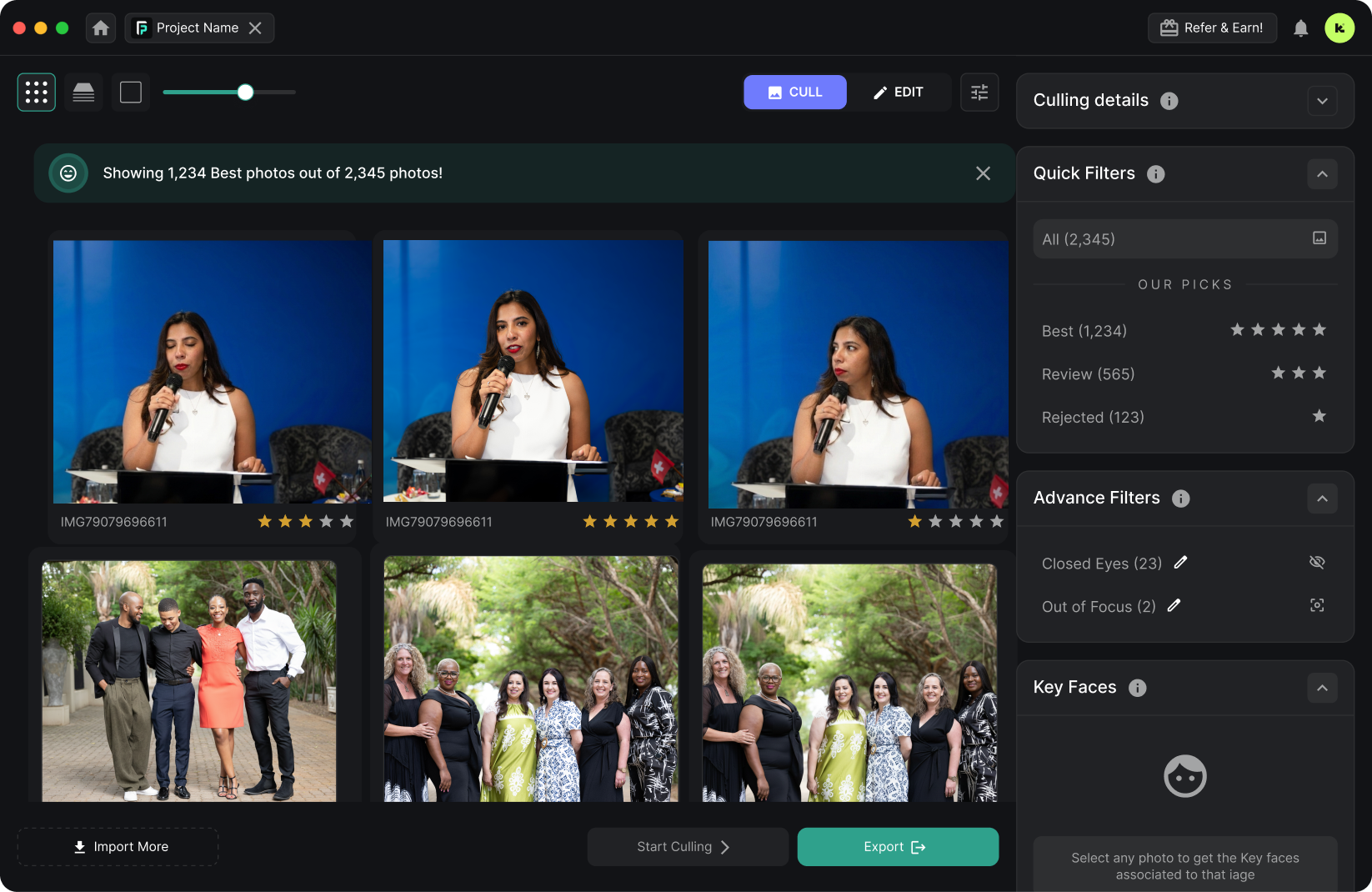
Culling in Photography: What It Actually Means
The word “cull” literally means to select and remove. In photography, culling photos is the workflow step where you review every image from a session and decide which ones make the cut.
A typical shoot produces far more images than a client needs. A wedding photographer might shoot 3,000–5,000 frames but deliver 400–800. A sports photographer at a single game might fire 2,000 burst-mode shots to get 150 usable images. A corporate event can generate 5,000+ photos that need to be narrowed to 200 same-day selects.
Culling is how you get from the raw count to the deliverable set. It’s not editing — it happens before editing. You’re evaluating:
- Technical quality — Is the image sharp? Is the exposure correct? Is the subject in focus?
- Duplicates — Which frame from a burst sequence is the strongest?
- Expression & moment — Are eyes open? Is the smile natural? Is the action at its peak?
- Composition — Is the framing strong? Is the background clean?
Done manually, culling 3,000 photos takes 2–4 hours. That’s 2–4 hours of clicking through images one at a time, often at the end of a long shoot day when your eyes are tired and your judgment is degrading. This is exactly why AI photo culling software has become essential for high-volume photographers.
Manual Culling vs AI Culling
There are two ways to cull photos: manually in Lightroom or Photo Mechanic, or automatically with AI software. Here’s how they compare.
The Speed vs Accuracy Trade-Off in AI Culling
Faster culling isn’t always better culling. The conventional wisdom is that the fastest tool wins — but speed without accuracy means you’re just quickly making bad selections.
In our testing across 10,000+ images, accuracy varied by genre. Generic AI models performed well on portraits but struggled with sports and events where moment timing matters more. Genre-specific tools like FilterPixel’s DeepCull closed this gap by adapting scoring criteria to the shoot type.
The most efficient culling workflow isn’t the fastest AI pass — it’s the one that requires the least human correction afterward. A tool that culls in 3 minutes but needs 30 minutes of manual overrides is slower overall than one that culls in 3 minutes and needs only 5 minutes of review.
Key takeaway: When evaluating AI culling software, don’t just compare raw processing speed. Ask: how many photos will I need to manually override after the AI finishes? That’s the real measure of efficiency. See our full accuracy benchmarks →
How to Cull Photos: Step by Step
Whether you cull manually or with AI, the workflow follows the same core steps. Here’s how to cull photos efficiently.
Import your photos
Upload your RAW or JPEG files to your culling tool. AI-powered tools like FilterPixel let you start uploading from your phone at the venue — no need to wait until you’re at your desk.
First pass: reject the obvious misses
Remove blurry shots, misfires, accidental shutter presses, and images with closed eyes. AI culling does this automatically by detecting sharpness, focus, and expression quality across every frame.
Second pass: pick the best from each group
Burst sequences and similar compositions get grouped. Choose the strongest frame from each group based on expression, timing, and composition. AI tools score every frame and surface the top pick automatically. FilterPixel’s DeepCull adapts scoring to your genre — peak action for sports, expressions for portraits.
Export selects to your editor
Export your final selects to Lightroom, Capture One, or your delivery platform. AI culling typically reduces a 3,000-photo shoot to 300–500 selects ready for editing. What took hours now takes minutes.
How AI Photo Culling Works
AI photo culling software uses machine learning models trained on millions of professionally curated images. The AI evaluates each photo across multiple dimensions simultaneously — something that would take a human seconds per image but takes the AI milliseconds.
Technical Analysis
Sharpness, exposure, noise level, and focus accuracy. The AI instantly flags technically flawed images that a tired photographer might miss on frame 2,000.
Expression & Moment
Eye openness, smile detection, facial expression quality, and peak-action timing. The AI identifies the decisive moment in a sequence of similar frames.
Composition & Context
Background cleanliness, subject positioning, framing balance, and narrative clarity. Advanced tools like DeepCull adapt these criteria to your shoot genre.
What makes FilterPixel different: Most AI culling tools use a single generic model. FilterPixel’s DeepCull lets you set your genre — conference, sports, concert, wedding, portrait — and the AI evaluates frames using criteria specific to that genre. Every photo gets a Score + Reason explaining exactly why it was selected or rejected. See how it compares to other tools →
Real Workflow: Culling 5,000 Conference Photos in 15 Minutes
“I built FilterPixel because I was spending 4 hours every night after conferences just picking the good shots.” — Aayush Arora, CEO, FilterPixel
During the event: I shoot with two bodies (Canon R5 + Sony A7IV). Between sessions, I pop the SD card into my phone adapter and upload the last batch to FilterPixel. The AI starts culling while I’m walking to the next keynote.
End of day: By the time the event wraps, 80% of my photos are already culled. I upload the final batch — FilterPixel finishes the remaining 1,000 photos in about 8 minutes. Total AI processing for 5,000 photos: about 40 minutes.
Human review: I spend 10–15 minutes reviewing the AI’s selections. The Score + Reason feature makes this fast — I see exactly why each photo was flagged. I disagree with about 3–5% of selections.
Total time from last shutter click to curated gallery: 20 minutes. Before AI culling, this took 4+ hours.
Best Photo Culling Software in 2026
The right culling tool depends on your genre, volume, and workflow. Here are the top options.
FilterPixel
Best for high-volume events
Genre-specific DeepCull AI, cloud processing, Score + Reason for every photo. Starts at $14.99/mo with 4 free projects.
Try Free →Aftershoot
Best for wedding photographers
Local processing, learning-based AI that adapts to your style. $9.99/mo for culling only. Requires a fast computer.
Compare alternatives →Imagen AI
Best for editing-focused workflows
Per-photo pricing starting at $0.05/photo. Stronger on editing than culling. Cloud-based.
See pricing breakdown →Culling Workflows by Genre
Different genres have different culling challenges. Explore workflow guides for your specialty.
Conference Photography
Same-day delivery for corporate events. Cull 5,000+ frames on-site.
Sports Photography
AI detects peak action in thousands of burst-mode frames.
Event Photography
Upload from the venue, deliver before you pack your gear.
Try AI Culling Free
4 free projects, unlimited photos, no credit card required.
The Future of AI Photo Culling
AI photo culling is evolving fast. Here’s where the technology is heading:
- Real-time culling during capture — Cloud-connected cameras will send frames for AI scoring as you shoot, flagging selects before the event ends.
- Deeper style learning — Future tools will learn your culling preferences — understanding which compositions and moments you consistently favor.
- Multi-camera merge culling — For events with multiple photographers, AI will merge and de-duplicate across camera bodies, selecting the best angle from each moment.
- Client preference matching — AI that learns what specific clients want (e.g., a corporate client who prioritizes headshots vs. candid energy shots).
The photographer’s role won’t disappear — it will shift. AI handles technical filtering; you focus on creative judgment. The photographers who adopt AI culling now are building workflows that scale as the technology improves.
Frequently Asked Questions
Stop Culling Manually.
Start Delivering Faster.
Join 14,000+ photographers who save hours on every shoot with AI culling.
Try FilterPixel Free4 projects • unlimited photos • no credit card
Related Reading
Written by Aayush Arora, CEO & Founder of FilterPixel
Published: April 2, 2026 · Last updated: April 7, 2026